What is blind signing, and why it keeps draining wallets
Two teams with multisigs and hardware wallets lost $1.55B to signatures they could not read. What blind signing is, and what to check.
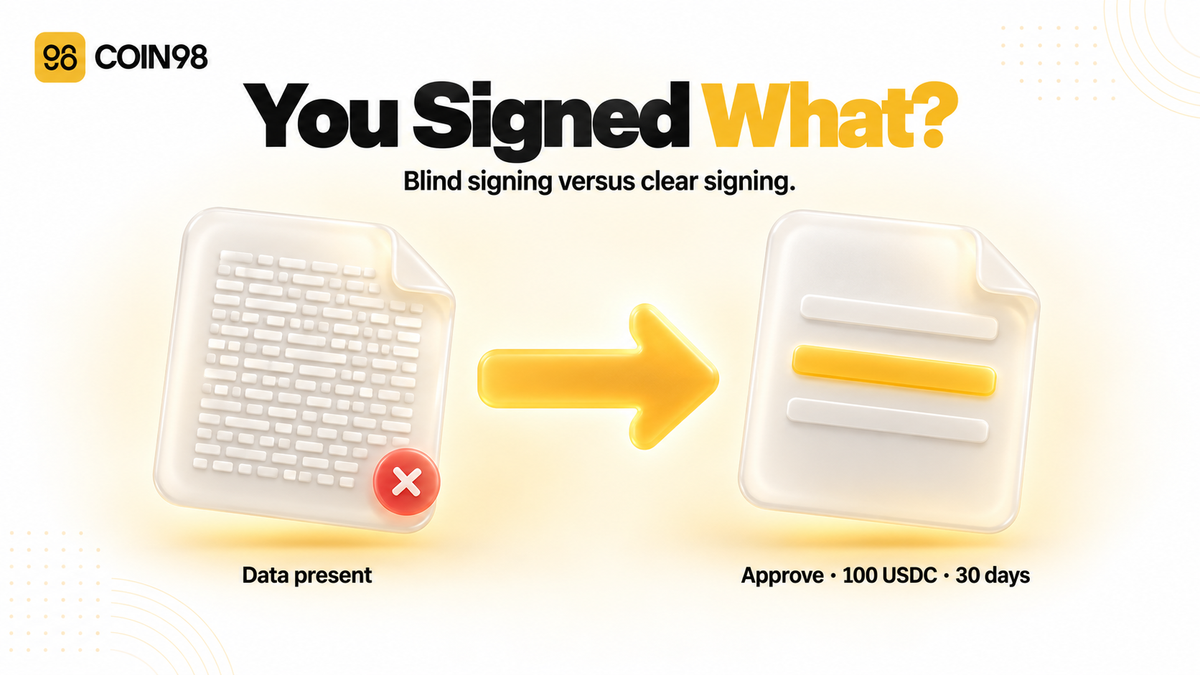
Blind signing is approving a transaction your wallet can't show you in plain language. Instead of "swap 100 USDC for ETH," the screen gives you a hash, a hex blob, or the words "Data Present" — and you either approve it or you don't. Your key signs whatever the payload really says, not whatever you assumed it said. That gap between the screen and the signature is how a 2-of-3 multisig lost roughly $1.5 billion in a single afternoon, and it's the same gap that empties ordinary wallets one approval at a time.
Last updated: August 2026
1. What blind signing is
Blind signing is confirming a smart contract interaction you don't know the full details of. The transaction is valid, your key is safe, and your device works exactly as designed — you just can't read what you're authorising.
The cause is a mismatch in age. Wallets and signing devices were built to handle simple transfers of value: this address, that amount, done. Modern transactions aren't that. They're function calls into contracts, with encoded parameters, nested routers, and permissions attached — and a device with no way to decode the contract can only show you the raw data and ask if you're sure.
Four kinds of interaction force it more than any others: NFT mints and marketplace purchases, DeFi deposits into liquidity, staking, or yield contracts, DEX swaps that route through an aggregator contract, and dApp calls arriving over a connection protocol. If you've done any of those, you've almost certainly blind signed something.
Why it exists at all
Blind signing is not a defect someone forgot to fix. It's the fallback that keeps the rest of DeFi usable.
A signing device can only describe a contract call if something told it what that call means. Function names don't reliably say what a function does, and encoded parameters carry no labels — so without external metadata, the honest thing for a device to display is the raw data. The alternative to showing you a hash is refusing to sign anything the device doesn't recognise, which would block every new contract on the day it launches.
So the benefit is real: blind signing is what lets you interact with a contract that was deployed this morning, on a chain your device has never seen, using an encoding nobody has published a description for. The cost is that you're trusting the app rather than the screen.
This is worth being precise about, because the common conclusion is the wrong one. A hardware wallet protects your private key from a compromised computer, and it does that job well. It doesn't verify that the transaction in front of you is one you'd want. Keeping your key offline and reading what it signs are two different problems, and connecting a Ledger device to your wallet solves the first one only.
How blind signing works
Three things happen in order, and only the middle one is visible to you.
The app builds a payload. A contract call is a function selector plus encoded arguments — a string of bytes. Nothing in it is self-describing.
Your wallet displays what it can. If it holds metadata for that contract, it renders a sentence. If it doesn't, it falls back to the hash, the raw hex, or a flag like "Data Present," and asks for confirmation anyway.
Your key signs the payload, not the display. The signature commits to the bytes. If the screen and the bytes disagree — because the interface was compromised, or because the device simply couldn't decode them — the bytes win. There is no step afterwards where the mismatch gets caught.
What you're approving isn't what you're sending
The most useful distinction in this topic is between a transaction and a signature, because they behave differently and cost differently.
A transaction moves something now, costs gas, and appears on-chain immediately. A signature authorises something — it can cost nothing, produce no on-chain record at the moment you sign, and sit unused for weeks before anyone acts on it. Token approvals are the common form: you're granting a contract permission to move your tokens on your behalf, up to a limit, with no expiry unless one is written in.
So "nothing happened when I signed" is not reassurance. The permission is live whether or not anyone has used it yet.
Connecting is a third thing, and it's the one people worry about unnecessarily. Connecting a wallet to a site exposes your address and lets the site request signatures — it doesn't move funds or grant spending rights on its own. The approval you sign afterwards is what does that.
2. Incidents and risks
How one signature empties a wallet
The drain works by getting you to grant spending rights and then exercising them, usually not at the same moment. No private key is stolen at any point.
A malicious site doesn't ask you to send tokens — you'd notice. It asks you to approve, and the request looks like the approval every legitimate swap needs.
Two functions do most of the damage. One grants a contract permission to spend a token balance, often for an amount so large it's effectively unlimited. The other grants blanket permission over an entire NFT collection in a single approval. Both are ordinary, both are needed by real applications, and both are indistinguishable from the malicious version when the screen shows a hash instead of a spender and an amount.
The amount field is where the choice sits. Approving the exact amount you're trading limits the damage to that amount; approving an unlimited allowance saves you a transaction later and leaves the door open indefinitely.
The signature that costs no gas
Newer approval standards let you authorise spending with an off-chain signature — no transaction, no gas, no on-chain trace at the time you sign. It's genuinely better UX, and it has become the vector behind the largest individual losses, because the usual tell that something is happening simply isn't there.
The 2025 numbers show it clearly. Of the eleven phishing cases above $1 million recorded that year, three were permit-style signatures, and those three accounted for $8.72 million — 38% of all losses from large cases. The single largest theft of 2025, $6.5 million in September, came through a permit signature.
You sign what looks like a login or a permission prompt. Nothing appears in your history. The signature is submitted later, by someone else, at a moment of their choosing.
What it adds up to
The scale is measurable, and it moves in both directions depending on which year you look at.
| Period | Losses | Wallets affected | Average loss per victim |
|---|---|---|---|
| 2023 | ~$295–300M | ~324,000 | — |
| 2024 | $494M | 332,000 | $1,488 |
| 2025 | $83.85M | 106,106 | $790 |
Between 2024 and 2025, losses fell 83% and victims fell 68%. Cases above $1 million fell from 30 to 11. The decline tracked market activity rather than any single defensive win — phishing scales with how many people are transacting, so a cooler market produces fewer victims without any attacker giving up.
Lower losses aren't gone threats. January 2026 recorded 4,741 victims losing $6.27 million to signature phishing, a 207% increase over December 2025.
The two times professionals signed blind
Two incidents are worth knowing in detail, because the victims were experienced teams using the security tools everyone recommends — and the tools worked. What failed was the display.
Bybit, February 2025. On 21 February 2025, roughly $1.5 billion in ETH — 401,347 coins — left a Bybit wallet in what remains the largest crypto theft on record.
The signing interface had been compromised. It showed the signers a correct destination address and a correct URL while the payload underneath had been changed. The signers confirmed a routine transfer that wasn't one. No private key was stolen, and the multisig requirement wasn't bypassed. Two authorised humans looked at a screen, believed it, and signed.
The lesson is one sentence long: they verified that they were signing, not what they were signing.
Radiant Capital, October 2024. On 16 October 2024, Radiant Capital lost about $50 million through a 3-of-11 multisig, and the mechanism is the more instructive of the two for anyone using a hardware wallet.
Three long-standing developers were compromised. Their hardware wallets couldn't parse the multisig platform's transaction format, so each signer saw a valid-looking blind signature prompt while actually approving a transferOwnership() call. The team reviewed transactions in simulation tooling beforehand and everything looked normal. Occasional failed transactions were routine enough that collecting signatures for a malicious one didn't stand out.
| Bybit | Radiant Capital | |
|---|---|---|
| Date | 21 February 2025 | 16 October 2024 |
| Loss | ~$1.5B (401,347 ETH) | ~$50M |
| Setup | 2-of-3 multisig | 3-of-11 multisig |
| Attack point | Compromised signing interface | Compromised developer machines |
| What signers saw | Correct address, correct URL | Unparsed blind signature prompt |
| Keys stolen | None | None |
Neither case says hardware wallets or multisigs don't work. Both say the same narrower thing: a signature you can't read is a signature you can't check, and adding more signers multiplies the number of people who can't check it.
3. Settings and habits that reduce the risk
Turn blind signing off, and turn on clear signing
The setting itself is the first control. Most signing devices ship with blind signing disabled and require you to enable it deliberately, per app. Leave it off by default and switch it on only for a specific interaction you've decided to trust — then switch it back.
Clear signing is the display fix: translating a contract call into a sentence you can read before you approve it. As of 2026 it's an industry standard rather than one vendor's feature. On 12 May 2026, the Clear Signing standard moved under the Ethereum Foundation's Trillion Dollar Security Initiative, having originated at Ledger and grown into a multi-vendor specification spanning hardware wallet makers, software wallets, connection protocols, security firms, and infrastructure providers.
The mechanism is ERC-7730: a JSON descriptor that maps a contract's functions to human-readable intents and tells a wallet how to render each field. Publish a descriptor for your contract, and wallets can show "approve unlimited USDC spending for contract X" instead of a hash. A companion standard, ERC-8213, covers what descriptors can't — brand-new contracts, custom encodings — by giving devices a verifiable fingerprint of the transaction data to cross-check instead. The principle the group states is what you see is what you sign.
Here's the limit, and it matters: clear signing doesn't alter how transactions are structured, broadcast, or settled. It changes what your screen says. A contract with no descriptor still signs blind, and a clear-signed transaction that reads perfectly can still be a bad idea — legible is not the same as safe. The volume hasn't shrunk either. One major exchange reported intercepting 22.9 million phishing attempts in the first quarter of 2026, and an $8.5 million DAO drain landed the same year.
What to check before you approve
Reading a signature request is a habit, not a skill. Four fields carry most of the meaning:
- Spender — which contract gets the permission. Compare it against the official contract address for the app you think you're using.
- Amount — an unlimited or absurdly long number means the permission has no ceiling. Approve the exact amount on anything holding meaningful value, and take the extra transaction.
- Request type — a transfer moves funds once; an approval grants ongoing rights; a message signature may be an off-chain authorisation worth more than either.
- The site itself — the domain in the address bar, not the one in the link you clicked. Lookalike domains and hijacked front ends are a routine entry point, which is why scam awareness still does more work than any single setting.
Three habits that do the most
Keep a separate wallet for minting and testing unfamiliar apps, so a bad signature can only reach what's in it.
Review the permissions you've already granted on a schedule. Coin98 Super Wallet's Wallet Approval tool lists live approvals per wallet, and Wallet Health surfaces risky ones without you having to hunt.
Cancel the approvals you no longer need rather than leaving them open — revoking is the only thing that closes the door once a permission exists, and doing it monthly keeps the list short enough to actually read.
One clarification people get wrong: disconnecting a dApp removes the site's access to your address. It does not revoke a token approval you already signed. Those are separate actions in every wallet.
4. What to do if you've signed something malicious
Speed matters, because an approval sits live until someone uses it or you revoke it. Work in this order.
1. Revoke the approval. Find the token and spender in your wallet's approval list and cancel the permission. This is the only step that actually closes the door — everything else limits the blast radius. If several approvals went to the same site, revoke all of them.
2. Move what's left. Send remaining assets to a wallet that has never touched the site. If the drain is in progress and gas is competitive, prioritise the largest balances; you may not win every race, and it's worth accepting that rather than freezing.
3. Audit every other approval on the same address. One malicious session usually produces more than one signature. Go through the full list on that address, not just the token you noticed, and check other chains — approvals are per-chain, and so is the review.
4. Check whether it was only an approval. If the same seed phrase or private key was ever entered on a suspicious site, revoking won't help: every wallet derived from that seed is compromised, and the only fix is a new seed phrase and a full migration.
5. Record and report. Save the transaction hashes, the signature request, and the domain. That record is what any exchange, protocol team, or investigator can act on later, and it's much harder to reconstruct a week afterwards.
Coin98's incident guidance and its step-by-step recovery guide cover the full sequence.
One thing not to do: don't sign anything a "recovery service" sends you. Approving a new transaction to undo an old one is the standard follow-up scam, and it targets people who have just been drained and are moving fast.
5. FAQ
What does "Data Present" mean on my hardware wallet? It means the transaction contains contract data the device can't decode into readable text. The device is telling you honestly that it doesn't know what this does. It isn't a warning that the transaction is malicious, and it isn't a promise that it's fine — it's an absence of information, which is exactly the condition under which we'd suggest not approving.
Should I turn blind signing off? For most people, yes, and turn it on only for a specific interaction you've decided to trust. Leaving it off blocks you from some NFT mints and DeFi contracts that have no descriptor published, which is inconvenient rather than harmful. Leaving it on permanently means every unreadable request looks the same as every other one.
Does a hardware wallet protect me from blind signing? It protects your private key, not your decision. Both incidents above involved hardware signing devices working correctly — the keys were never stolen. A hardware wallet plus a readable transaction is strong; a hardware wallet plus a hash is a slower way to sign the same thing.
Can a signature I gave months ago still be used? Yes. Token approvals don't expire on their own, and off-chain permit signatures can carry deadlines set far in the future. That's why reviewing old permissions matters even when nothing has gone wrong — the risk from a forgotten approval doesn't fade with time.
Does disconnecting a dApp revoke its approvals? No. Disconnecting removes the site's access to your address and stops it requesting new signatures. Approvals you already granted stay live until you revoke them separately.
I think I signed something malicious. What now? Revoke the approval for the affected token and spender, move remaining assets to a wallet that has never touched the site, then check every other approval on the same address. Section 4 has the full sequence, including what to do if a seed phrase was exposed.
The takeaway
Blind signing isn't an exotic attack. It's the ordinary condition of using DeFi with a screen that can't read what your key is about to authorise, and it cost more than $1.5 billion in two incidents alone. Clear signing narrows the gap; checking the spender, the amount, and the request type closes more of it. Coin98 Super Wallet keeps the approval list, the revoke tool, and the health scan in one place, so the permissions you've granted stay something you can see rather than something you have to remember.