Telegram crypto wallets explained: self-custody in messaging apps
A Telegram crypto wallet can be custodial, seed-phrase based, or tied to your login. Two questions tell you which, and what happens if you lose it.
A Telegram crypto wallet sounds like one thing, but there are at least three kinds: one where a company holds your coins, one where only you hold the key, and one linked to your Telegram login. They look similar in a chat window and behave very differently when something goes wrong. With more than 1 billion people using Telegram each month as of March 2025, it's worth knowing which one you have. Here's how to tell in two questions, how to back it up, and how to spot the fake bots that target Telegram users.
Last updated: October 2026
What is a Telegram crypto wallet?
A Telegram crypto wallet is a wallet you open and use inside Telegram, usually through a bot or a mini app, without installing a separate app. You can hold tokens, send them to other people, swap and sometimes buy crypto with a card. The important difference between wallets is who controls the keys.
| Type | Who holds the key | Seed phrase you can see? | What can go wrong |
|---|---|---|---|
| Custodial bot wallet | The provider | No | The provider can freeze, restrict or lose your funds |
| Self-custodial wallet with a seed phrase | You | Yes, at creation | You lose the seed phrase, or someone tricks you into sharing it |
| Wallet linked to your Telegram login | You, with access through your Telegram account | Depends on the wallet; check before funding | You lose the Telegram account without a backup |
The third type is a kind of embedded wallet: created inside an app, signed into with an account you already have, often with no 12 words to write down at the start.
Telegram's own wallet and third-party wallets
Telegram's built-in wallet has changed several times. Its original version was custodial by design, to make onboarding easy, and a separate self-custodial option followed in 2023. A self-custodial TON Wallet launched for US users on 22 July 2025. On 31 August 2026, Telegram's founder announced a non-custodial Gram wallet, starting with a limited group of users.
Alongside Telegram's own wallet, independent wallets run inside Telegram too. Coin98 Telegram Wallet turns your Telegram account into a multi-chain wallet covering 150+ blockchains. It lets you buy tokens with Visa, Mastercard, Google Pay or Apple Pay, and trade and transfer without leaving the chat. It's self-custodial, which the next section shows how to check for yourself.
Is a Telegram wallet self-custody? Two questions decide it
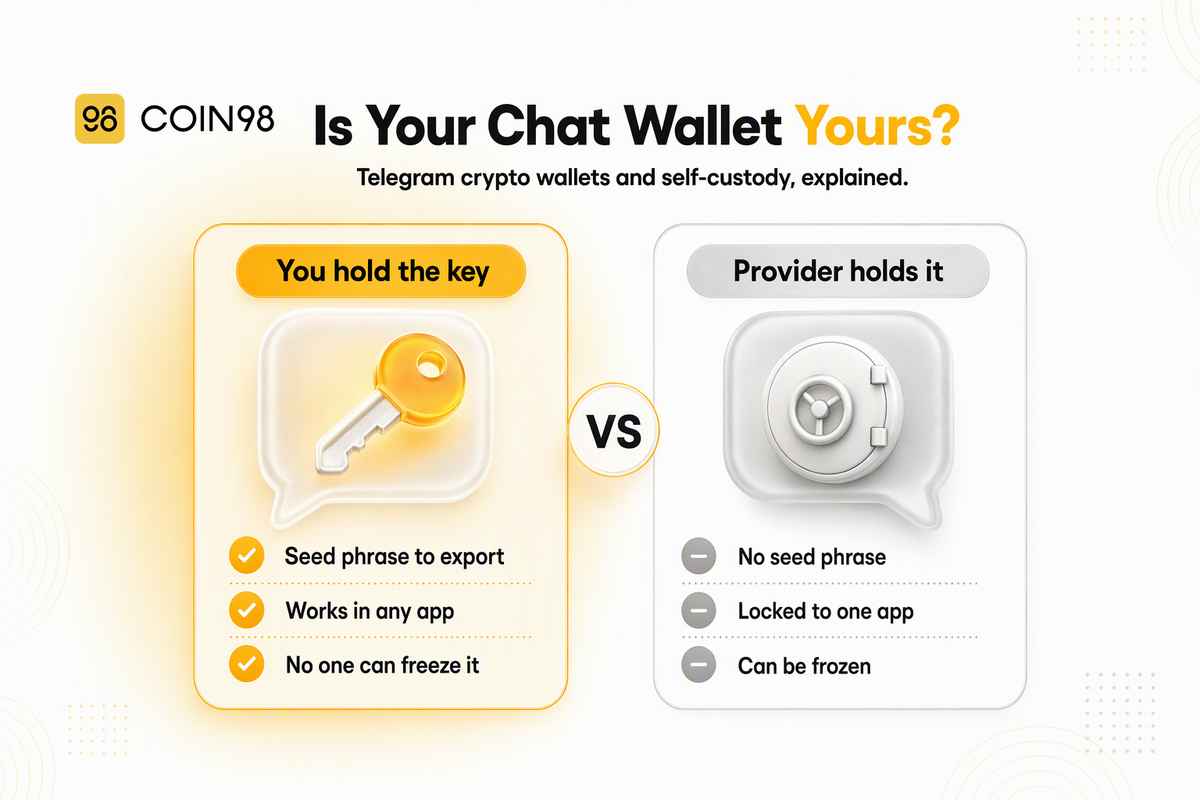
A Telegram wallet is self-custody only if you can get its keys out, and no company can reset or freeze your access. Those two questions apply to any wallet in any chat app, whatever the marketing says. Our guide to true self-custody covers the wider principle.
Can you see and export the seed phrase?
This is the strongest single test. If the wallet can show you a seed phrase or private key, you can restore the same wallet in a different app, so your funds don't depend on the original provider or on Telegram. If there's no way to see the key, someone else holds it, at least in part.
Who can reset or freeze your access?
With a custodial wallet, the provider can restore your account, and it can also freeze it, restrict it in your country or ask for identity checks before a withdrawal. With a self-custodial wallet, nobody can do that. The flip side is that nobody can recover it for you either. If the only way back in is your Telegram login, then your Telegram account security is your wallet security.
How Coin98 Telegram Wallet answers both
Coin98 Telegram Wallet offers three wallet types:
- Telegram Wallet: created instantly with your Telegram account. It's the one you get when you first press Start.
- Hot Wallet: a standard non-custodial wallet with its own 12- or 24-word seed phrase, created fresh or imported.
- Watch-only: tracks any address without holding a key.
For the first two, you can show the seed phrase or private key from the app (More → Show Seed Phrase), as long as the wallet is still active there. That passes the export test: the Telegram-linked wallet can be restored in another app.
What happens if you lose your Telegram account
If you lose your Telegram account, you lose the easy way into a Telegram-linked wallet. Whether you lose the funds depends entirely on whether you backed up the seed phrase first. Coin98's docs warn that hot wallets can be logged out when you update Telegram or log out of your account. They also note that without the seed phrase, Coin98 can't help you recover the wallet.
Back up before you need to
We strongly recommend writing down the seed phrase of every wallet in your Telegram app on the day you fund it, and storing it offline. That includes the wallet created automatically from your Telegram account. The retrieval steps only work while the wallet is still active in the app. So a lost phone, a deleted account or a logout can close the window for good.
Moving your wallet to a regular app
A seed phrase also lets you take the wallet with you. Coin98's docs show the Telegram wallet's seed phrase being imported into Coin98 Super Wallet as a multi-chain wallet. You get the same addresses and funds in a standalone mobile app. Many people keep a small spending balance in Telegram and larger amounts in a separate wallet.
Lock down the Telegram account itself
When your Telegram login opens your wallet, it's worth securing like a bank login. Telegram doesn't require a password by default, so these settings are worth turning on:
- Two-step verification. Set a password Telegram asks for when you log in on a new device, and add a recovery email. Skip the password hint.
- Passkey login, where available. It replaces SMS login codes with your device's fingerprint, face or PIN. Text-message codes are the weak point that SIM swap attackers exploit.
- Active sessions. Review the list of logged-in devices in Telegram's settings and end any session you don't recognise.
- Phone number privacy. Set "Who can see my phone number" to Nobody to make you a harder target for impersonation.
The scams around Telegram wallets
Most losses tied to Telegram wallets don't come from breaking the wallet. They come from the chat around it: a fake bot, a fake "verification" step or a fake support agent. These are social engineering attacks, and they all end the same way, with you handing over a key, a signature or control of your device.
Fake bots and look-alike handles
Anyone can create a bot with a name and profile picture copied from a real wallet. The username (the @handle) is what identifies it. Coin98's docs say to choose the bot with the @coin98_bot handle, and the same habit we recommend for verifying wallet apps applies here. Open bots from a link on the provider's official site instead of from a search result or a group message, and check the handle letter by letter.
Fake verification bots
In December 2024, scammers ran a campaign that paired fake influencer accounts on X with Telegram groups guarded by a fake "Safeguard" verification bot. The "verification" asked users to run a short code on their computer. That code installed malware which stole wallet keys. About 300 impersonator accounts were being found each day that December, up from 160 in November, and victims of the links lost at least $3 million. No real verification step asks you to paste anything into your computer's terminal or Run box.
Fake support messages
If you post in a group that your wallet isn't working, expect a direct message from "support" within minutes. Legitimate support teams generally don't start conversations in your DMs. Coin98 Telegram Wallet's support is inside the app, under Services → Live Chat. Nobody legitimate will ask for your seed phrase, in a chat or anywhere else.
A quick check before you act on any Telegram message:
- Did I open this bot from an official link, and does the @handle match exactly?
- Is it asking for my seed phrase, private key or a code to run? If so, it's a scam.
- Did "support" message me first? If so, it's very likely a scam.
- Is there a countdown or a "verify in 60 seconds" deadline? Urgency is the tell.
Frequently asked questions
Is a Telegram crypto wallet safe? It depends on the type. A self-custodial wallet whose seed phrase you've backed up offline is as safe as any mobile hot wallet. A custodial one depends on the provider. In practice, the bigger risks are fake bots, fake support and losing access to your Telegram account without a backup.
What happens to my crypto if I lose my Telegram account? If the wallet is self-custodial and you saved the seed phrase, your crypto is safe. You can restore the wallet in another app, such as Coin98 Super Wallet. Without a backup, a self-custodial wallet usually can't be recovered by anyone, so back it up while you still have access.
How do I know if my Telegram wallet is self-custodial? Check whether it lets you view and export a seed phrase or private key. If it does, you control the wallet and can move it to another app. If it doesn't, a provider holds the key, and that provider can restrict or freeze your funds.
If someone hacks my Telegram account, can they take my crypto? For a wallet linked to your Telegram login, someone who takes over your Telegram account may be able to open the wallet too. That's why two-step verification, a recovery email and a review of active sessions are worth setting up. Wallets protected only by a seed phrase you never stored in Telegram aren't exposed this way.
Will Coin98 support ever message me first on Telegram? Coin98 Telegram Wallet's support runs through Live Chat inside the app. Treat any unsolicited direct message offering wallet help as a scam. We strongly recommend against sharing your seed phrase with anyone who asks for it.
Can I use the same wallet in Telegram and in a regular wallet app? Yes, if it's self-custodial. Import its seed phrase into the other app and you'll see the same addresses and balances in both. Both apps then rely on the same seed phrase, so it's worth protecting carefully.
The short version
A Telegram crypto wallet is only as self-custodial as its keys are exportable. Find out which type you have, back up its seed phrase offline on day one, and lock down the Telegram account that opens it. Then ignore every bot and "support agent" you didn't seek out yourself. Coin98 Telegram Wallet runs through @Coin98_bot, lets you view your seed phrase in the app, and moves to Coin98 Super Wallet whenever you want a standalone app.