What is WalletConnect, and when do you actually need it?
WalletConnect isn't a wallet or an app you download. How it links your wallet to dApps, when you need it, and why signing is the real risk.
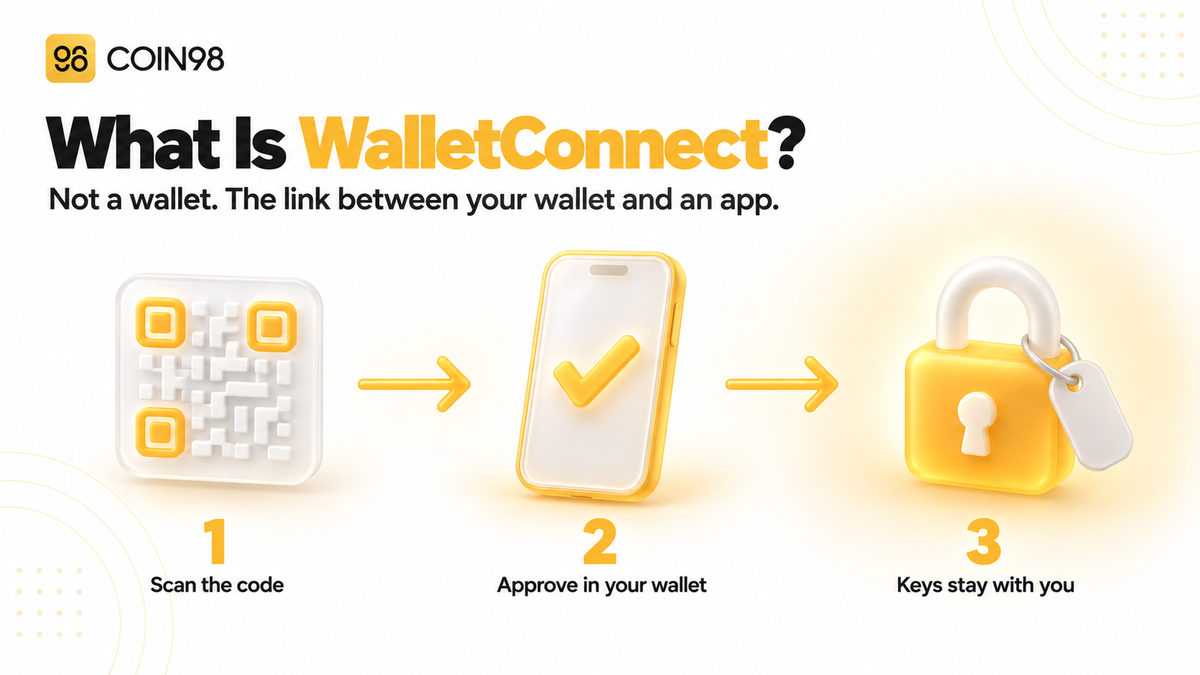
You click Connect Wallet on a crypto app, and your wallet isn't on the list. What you see instead is "WalletConnect" and a QR code. So what is WalletConnect? It's an open-source connection method built into hundreds of wallets and tens of thousands of dApps. It lets the wallet on your phone talk to an app on another screen or in another app, without your private key ever leaving the wallet. In 2025 alone, it handled 392 million connections. Here's how it works, when you actually need it, and what to watch for once you're connected.
Last updated: September 2026
What WalletConnect is, and what it isn't
WalletConnect is a protocol — a shared set of rules — that creates an encrypted link between a crypto wallet and a decentralized app (dApp). It doesn't hold funds, store keys, or sign anything. It passes requests from the dApp to your wallet, and your answers back.
A connection method, not a wallet
WalletConnect isn't a wallet, and you don't need a separate WalletConnect app to use it. It's already built into the wallet you have. When a dApp offers "WalletConnect" as an option, it means "connect using whichever compatible wallet you already use."
That's worth knowing, because it's one of the easiest things for scammers to exploit. We cover how later in this article.
WalletConnect has been running since 2018. By the end of 2025, it reported 700+ supporting wallets and 85,000+ apps. That year, total connections grew from 179 million to 392 million, and more than 55.5 million unique users connected through it.
What happens when you scan the QR code
A WalletConnect connection follows the same basic steps each time:
- The dApp shows a QR code (on desktop) or opens your wallet with a deep link (on mobile). Either one contains the details needed to pair.
- Your wallet shows a connection request with the dApp's name and website, and the networks it wants to use.
- You approve or reject. Nothing is shared until you approve.
- Requests travel through WalletConnect's relay network, encrypted between your wallet and the dApp.
- Every transaction or signature appears in your wallet for you to review. Your private key stays in the wallet and signs there.
The dApp can ask. Only your wallet can sign.
Why v2 matters
The original version of WalletConnect was shut down on 28 June 2023 and replaced by v2, which isn't backward-compatible. Two changes matter for users. A single connection can cover several networks at once, so you don't need to reconnect every time you switch chains. And after the initial pairing, you don't need to scan a fresh QR code for every session. Coin98 added WalletConnect v2 support in August 2023, covering EVM chains as well as non-EVM networks such as Solana, Cosmos, and Polkadot.
When you actually need WalletConnect
You need WalletConnect mainly when your wallet and the dApp are on different devices or in different apps, such as a mobile wallet and a website open on your laptop. If your wallet can open the dApp directly, you usually don't need it.
Extension, dApp browser, or WalletConnect?
| Your situation | Simplest option | Is WalletConnect needed? |
|---|---|---|
| Desktop browser, with your wallet installed as an extension | Connect through the browser extension | No |
| Phone only, wallet has a built-in dApp browser | Open the dApp inside the wallet's browser | No |
| dApp on your laptop, wallet on your phone | Scan the dApp's WalletConnect QR code with your phone | Yes |
| Phone only, dApp open in a regular mobile browser or another app | Choose WalletConnect and let it deep-link to your wallet | Usually |
| Your wallet isn't listed on the dApp's connect screen | Choose WalletConnect and select or scan with your wallet | Yes |
In Coin98 Super Wallet, the DApp Browser supports dApps on more than 100 blockchains. So on your phone, opening a dApp through Discover is often simpler than using WalletConnect. WalletConnect matters most when you're working on a computer and want to keep your keys on your phone.
Connecting with Coin98 Super Connect
Coin98 Super Wallet includes Super Connect, which Coin98 describes as an optimized version of WalletConnect for smoother connections. To use it:
- On the dApp, choose WalletConnect on the connect screen to display a QR code.
- In Coin98 Super Wallet, tap the Scan icon at the top right, or open Super Connect from the Discover menu.
- Scan the QR code and choose which wallet to connect.
- Review the request, including the site name and networks, then tap Connect.
From then on, any transaction the dApp proposes will appear in Coin98 Super Wallet for you to approve or reject.
Is WalletConnect safe?
As a connection method, WalletConnect is generally considered safe. Messages between your wallet and the dApp are encrypted, and your private key never leaves your wallet. The real risks come from connecting to a malicious site, signing a harmful request, or downloading a fake "WalletConnect" app.
Connecting isn't the risky part — signing is
Connecting a wallet shares your public address with the dApp and lets it send you requests. It doesn't give the dApp permission to move your funds. Money only moves after you sign something, such as a transfer, a token approval, or a permit message.
That's why the most important security check happens at the signing screen, not the connection screen. If a request is unclear or you can't read what it does, don't sign it. Our guide to blind signing explains why unreadable requests are so dangerous.
What a connected dApp can and can't do
| A connected dApp can | A connected dApp can't |
|---|---|
| See your public wallet address and balances on the approved networks | See your seed phrase or private key |
| Ask you to sign transactions and messages | Sign anything without your approval |
| Ask to switch networks | Move funds on its own just because you connected |
| Keep the session open until it expires or you disconnect | Undo token approvals you've already signed |
The last row works both ways. A token approval is recorded on-chain. It stays valid after you disconnect, until you revoke it.
Fake WalletConnect apps and messages
Because many people assume WalletConnect is an app, scammers make fake ones. In 2024, a fake app called "WalletConnect" stayed on Google Play for about five months. Part of how it got through review was by posing as a calculator app. It was downloaded more than 10,000 times, and over 150 people lost a combined $70,000 or so. The app didn't ask for seed phrases. Instead, it sent users to a malicious site, asked them to connect, and then got them to authorize transactions that drained their tokens, starting with the most valuable ones.
Messages impersonating WalletConnect follow a similar pattern. They claim your wallet needs to be "validated" or "synced" and send you to a page asking for your recovery phrase. WalletConnect never needs your seed phrase. For more on spotting imitation sites, see our guide on how to check a dApp before you connect.
Domain warnings help, but only so far
WalletConnect offers wallets a verification tool. It checks whether the website sending a connection request matches the domain the app registered, and whether that domain is on a list of known scam sites. Wallets that use it can show a warning or block the connection. It's a useful safeguard, but it only covers domain checks and known threats. A brand-new phishing site may not be flagged yet, so it's still worth checking the URL yourself.
How to manage and end WalletConnect sessions
A WalletConnect session stays active until it expires or one side disconnects. That means a dApp you used last week may still be connected. We suggest disconnecting when you're done and checking your token approvals separately.
How long a session lasts
By default, a WalletConnect session lasts seven days. The wallet or dApp can extend it, so it's not a hard limit you can rely on. Closing the browser tab doesn't always end the session either.
Disconnect, then check approvals
In Coin98 Super Wallet, open More, then More Wallet Features, then Manage Connection. Select the wallet and tap the X next to any dApp you want to disconnect. If you use Coin98 Extension, it has its own connection manager.
Disconnecting stops a dApp from sending new requests, but it doesn't cancel token approvals. To remove those, use Wallet Approval and revoke any allowance you no longer need. Revoking an approval is an on-chain transaction, so you'll need enough of the network's native coin to pay the gas fee.
A simple routine covers most risks:
- Connect only from a URL you've checked, not from a link in a DM or an ad.
- Read every request in your wallet before signing.
- Disconnect dApps you're not actively using.
- Review token approvals monthly. Our dApp permissions guide walks through what to look for.
Frequently asked questions
Is WalletConnect a wallet? No. WalletConnect is a connection protocol built into wallets and dApps. It links your existing wallet to an app, but it doesn't store funds or keys. You don't need a separate WalletConnect app to connect.
Can a dApp steal my crypto just because I connected with WalletConnect? Not from the connection alone. Connecting shares your public address and lets the dApp send requests, but funds only move after you sign a transaction, approval, or permit in your wallet. The risk is signing a malicious request, so read every prompt before you approve it.
Does WalletConnect have access to my seed phrase or private key? No. Your private key stays in your wallet, and signing happens there. Messages between the wallet and the dApp are encrypted as they pass through WalletConnect's relay network. Any site, app, or email claiming it needs your seed phrase to use WalletConnect is a scam.
How long does a WalletConnect session last? By default, a session lasts seven days, but the wallet or dApp can extend it. It's best to disconnect dApps manually once you're done, rather than waiting for the session to expire.
Does disconnecting a dApp revoke my token approvals? No. Disconnecting stops new requests, but token approvals are stored on-chain and remain valid until you revoke them. In Coin98 Super Wallet, you can revoke them with Wallet Approval.
Does Coin98 Super Wallet support WalletConnect? Yes. Coin98 Super Wallet supports WalletConnect v2, and its Super Connect feature is built on WalletConnect. On the dApp, choose WalletConnect, then tap the Scan icon in Coin98 Super Wallet to scan the QR code and approve the connection.
Connect with intent
WalletConnect solves a simple problem: it links your wallet to an app on another screen without exposing your keys. You don't need to install it, and in many cases you won't need it at all. When you do use it, focus on what you're signing, disconnect when you're done, and review your approvals regularly. Coin98 Super Wallet brings those steps together with Super Connect, Manage Connection, and Wallet Approval.