Crypto malware: the patterns that keep draining wallets, and the habits that stop them
Malware rarely breaks a wallet. It gets onto the device. The five patterns behind most wallet drains, and the habit that stops each.
At the end of October 2026, attackers moved about $6.3 billion out of Binance, the largest crypto theft on record. The exchange's initial investigation pointed to one compromised laptop belonging to an engineer. You don't run an exchange, but the lesson carries over: crypto malware rarely breaks the wallet itself. It gets onto the device where you keep or use the wallet, and waits. This guide covers the five patterns behind most malware-driven wallet drains, how each one gets in, and the habit that stops it.
Last updated: November 2026
What is crypto malware?
Crypto malware is malicious software that steals crypto by reading or changing what happens on your device: the wallet files, the seed phrase, the passwords, or the address you're about to send to. It doesn't need to "hack" the blockchain. If it can see your keys or alter a transaction before you sign it, the network will process the theft like any normal transfer.
What it's looking for
Most wallet malware hunts for the same few things:
- Seed phrases and private keys saved in notes, documents, screenshots, password managers or cloud drives
- Browser wallet data and saved passwords, so it can unlock an extension wallet
- Clipboard contents, to read a copied seed phrase or swap a copied address
- Session cookies for exchange accounts
- Keystrokes, to capture a seed phrase as you type it
How common it is
Theft from individual wallets is now a high-volume crime. In 2025, there were about 158,000 personal wallet compromises affecting more than 80,000 people, with about $713 million taken from individuals. That figure covers phishing and other key theft as well as malware, so not every case starts with an infected device. Our hacked-wallet guide lists malicious software that steals passwords, browser data, keyboard input or clipboard content as the first cause to check.
Five malware patterns that keep draining wallets
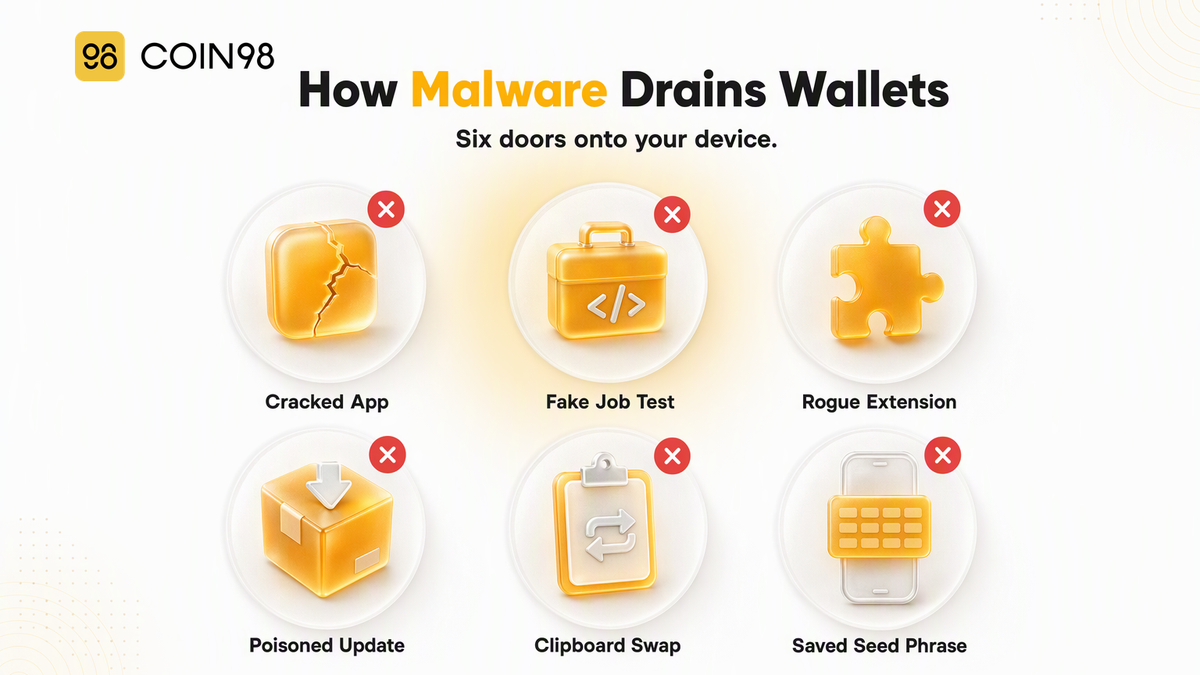
Five patterns account for most malware-driven wallet thefts. Each one reaches your device through a different door, which is why one antivirus scan rarely covers all of them.
1. Infostealers in cracked and fake software
An infostealer is malware built to grab everything valuable on a device in one pass: browser data, saved passwords, wallet files and documents. It usually arrives inside something free: cracked software, game cheats, "free" AI tools, fake installers or a pop-up telling you to run a command to "fix" an error. Many run briefly, upload what they find and leave little trace, so you may not notice anything until the wallet is empty.
2. Fake job interviews and coding tests
A "recruiter" from a crypto or AI company offers a well-paid role, then sends a coding test or asks you to fix a bug in their project during a call. Running that project installs malware. Between December 2025 and July 2026, one such campaign, linked to North Korean operators, infected more than 30,000 devices in over 100 countries and compromised more than 7,000 crypto wallets. It harvested browser passwords, clipboard contents, keystrokes and seed phrases.
3. Browser extensions that turn bad
Wallet-stealing extensions don't always start out malicious. In August 2026, 19 Chrome and Edge extensions were found carrying wallet-stealing code. Many worked as advertised when first published, and five were bought from their original developers and then updated with malware, which browsers install automatically. They hijacked "Connect Wallet" and "Swap" buttons on dApps and showed fake hardware-wallet pages asking for seed phrases.
4. Poisoned packages and updates
Sometimes the app you trust is the one carrying the malware. On September 8, 2025, attackers took over popular open-source code packages with billions of weekly downloads. Any website that pulled in the bad versions quietly replaced wallet addresses with the attacker's. Losses stayed small, but the method showed how a trusted site can turn hostile overnight without its owners knowing.
5. Clipboard swappers
A clipper watches your clipboard. When you copy a wallet address, it swaps in an attacker's address, sometimes one chosen to match the first and last few characters. If you only check the ends, the transfer looks right. Our guide to clipboard hijacking covers this pattern in depth.
The habits that stop crypto malware
Security software helps, but the strongest protection against crypto malware is a set of habits that make stolen data useless. If your seed phrase never touches a connected device and every transaction is approved somewhere the malware can't reach, an infection costs you far less.
| Pattern | How it gets in | Habit that stops it |
|---|---|---|
| Infostealer | Cracked software, fake installers, "fix this error" prompts | Install only from official sources; keep the seed phrase off the device |
| Fake job interview | Recruiter's coding test or project | Run test code on a separate machine with no wallet on it |
| Malicious extension | New install or an update to an old one | Keep few extensions; use a browser profile just for crypto |
| Poisoned package | A trusted site or app is compromised | Check the full address on the signing screen |
| Clipboard swapper | Any infection, often bundled with others | Compare the full address; clear the clipboard |
Keep the seed phrase off connected devices
We strongly recommend never storing a seed phrase as a photo, note, email or cloud file. Write it on paper or metal and keep it offline. Infostealers and fake-job malware search for exactly those files. Our complete guide to seed phrases covers safe storage options.
Sign somewhere the malware can't reach
A hardware wallet keeps keys on a separate device and asks you to confirm each transaction on its own screen, so malware on your computer can't sign for you. Coin98 Extension supports this: you can connect a Ledger to Coin98 Extension and keep using the extension for dApps. If a hardware wallet isn't practical, a phone used only for crypto, with no other apps, cuts most of the doors on this list.
Keep a short extension list
Every extension with access to "all websites" can read the pages where you sign. We suggest removing extensions you don't use, using a separate browser profile for crypto with only the wallet installed, and locking Coin98 Extension when you step away.
Check the address on the signing screen
Check the full recipient address where you approve the transaction, not only in the field you pasted into. On mobile, Coin98 Super Wallet's Clear Clipboard feature stops other apps reading the clipboard and clears it automatically after one minute. Signing data you can't read is its own risk, covered in our explainer on blind signing.
What to do if you think your device is infected
If you suspect malware, assume anything on that device has been seen, and move your funds from a different, clean device. Speed matters, because an attacker with your keys can move funds at any moment.
- Switch devices. Install Coin98 Super Wallet or Coin98 Extension on a device you trust, not the infected one.
- Create a new wallet with a new seed phrase, and write that phrase down offline.
- Move your remaining funds from the old wallet to the new one. If a sweeper script is draining the old wallet, we'd recommend against sending it extra tokens to pay gas, because the sweeper can take them instantly.
- Stop using the old wallet. Don't reconnect it to dApps or store new assets in it.
- Clean or wipe the infected device, then change passwords for email and exchange accounts from a clean device.
Our hacked-wallet guide walks through each step, and a Wallet Health scan helps find risky dApp connections and approvals left behind.
FAQ
Can malware steal crypto from a wallet?
Yes. Malware can't break a blockchain, but it can steal the seed phrase or browser wallet data that controls your funds, or change the address in a transaction before you sign it. Once it has your keys, the attacker can move the funds like a normal transfer.
What is an infostealer?
An infostealer is malware that collects passwords, browser data, wallet files and documents from an infected device and sends them to an attacker. It usually arrives in cracked software, fake downloads or fake "fix" prompts. Many run briefly and leave little trace.
Can a browser extension steal my crypto?
Yes. A malicious extension can read the pages where you sign, replace dApp buttons or show fake wallet pages. Some extensions start out clean and become malicious after an update or a change of owner, so we suggest keeping only extensions you actively use.
Does a hardware wallet protect against malware?
It protects your keys, because they stay on the device and each transaction needs confirmation on its screen. It can't stop you approving a bad transaction, so check the address and amount on the hardware wallet's own screen before you confirm.
Is it safe to run code from a recruiter?
We'd recommend against running any code, project or "test" from a recruiter on a device that holds a wallet or seed phrase. Fake job interviews have infected tens of thousands of devices since late 2025. If you must run it, use a separate machine with nothing of value on it.
Conclusion
Crypto malware doesn't beat the blockchain. It beats the device where you keep your keys. Five patterns cause most of the damage, and each one is stopped by a habit: keep the seed phrase offline, sign somewhere separate, keep extensions few, and check the full address. Set that up once in Coin98 Super Wallet and the next infection, if it comes, has much less to take.