Clipboard Hijacking: What It Is and How to Protect Your Crypto
Clipboard hijacking silently swaps your copied wallet address mid-paste — learn how clipper malware works and how to stop it before you hit send.
You copy a wallet address, paste it into a transaction, and hit send — except the address that arrives is not the one you copied. That is clipboard hijacking. One attacker used a single variant of this malware to accumulate over $560,000 in stolen crypto, according to Trust Wallet's security research. The attack is silent, invisible to the eye, and works against any blockchain where addresses are long enough that users tend to skip reading them character by character.
This article explains how clipboard hijacking works, how to spot the warning signs, and practical steps to protect your crypto before you hit send.
What Is Clipboard Hijacking?
Clipboard hijacking is a cyberattack in which malware intercepts and silently modifies data you copy to your clipboard — replacing wallet addresses, passwords, or other sensitive content with attacker-controlled substitutes before you paste them.
In the context of crypto, the target is almost always a wallet address. When you copy a Bitcoin or Ethereum address, the clipboard hijacker swaps it with the attacker's address in the fraction of a second before it lands in the transaction field. Because crypto addresses are 26–62 character strings of random letters and numbers, most users paste without reading.
The malware category is sometimes called a clipper or clipper malware, and it has been documented on Windows, Android, and — as of February 2026 — Linux systems as well.
Coin98 Super Wallet operates as a self-custody wallet, meaning your private keys never leave your device. That design removes one major attack surface. However, clipboard hijacking operates at the operating system level rather than the wallet level, so address verification remains the user's responsibility regardless of which wallet is in use.
How Clipboard Hijacking Works
Clipboard hijacking malware typically follows a three-stage lifecycle.
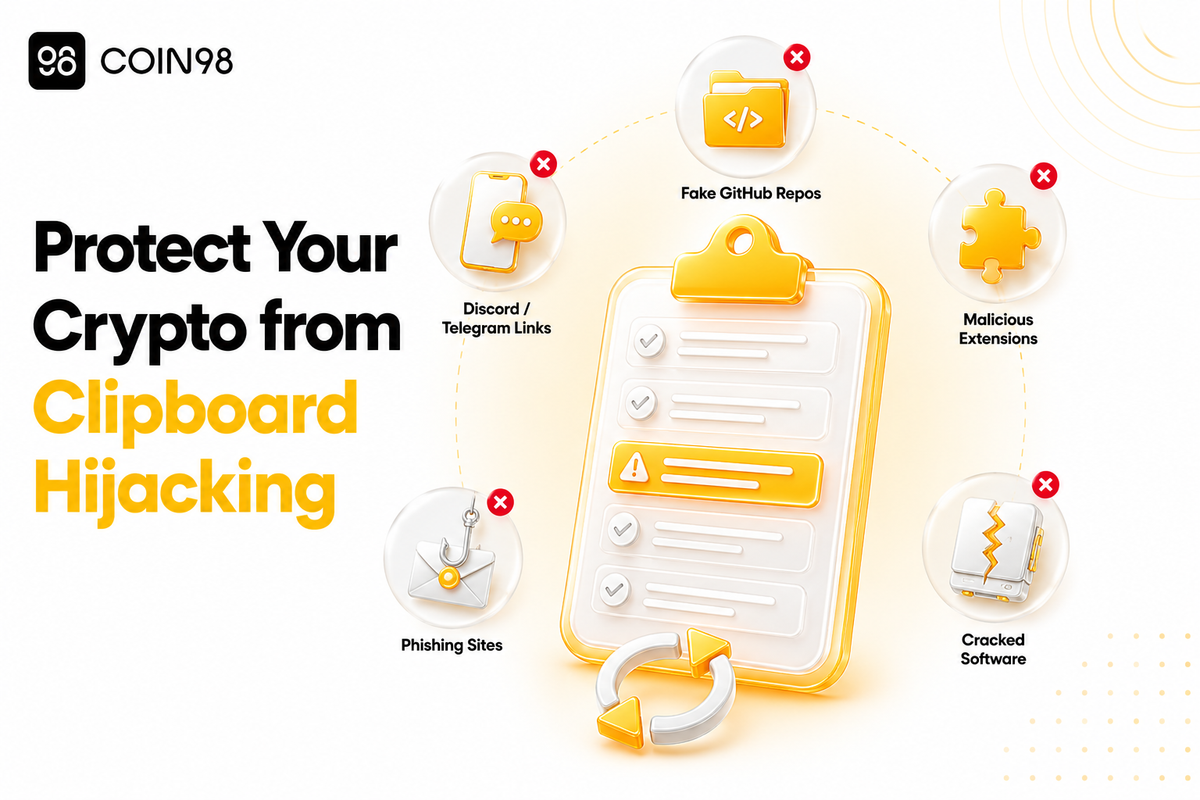
Stage 1 — Infection. The malware arrives through social engineering: fake apps bundled with a clipper payload, cracked software downloads, malicious browser extensions, phishing links on Discord or Telegram, or compromised GitHub repositories. In one 2024 campaign dubbed GitVenom, attackers distributed clipboard hijackers through fake GitHub repositories, and victims reportedly lost around 5 BTC before the campaign was uncovered.
Stage 2 — Surveillance. Once installed, the clipper runs silently in the background, polling the clipboard at rapid intervals. A February 2026 Linux variant named ClipXDaemon, analyzed by Cyble's threat research team, monitors the clipboard every 200 milliseconds. It uses regular-expression pattern matching to detect cryptocurrency address formats across eight coin types: Bitcoin, Ethereum, Litecoin, Monero, Tron, Dogecoin, Ripple (XRP), and TON. Notably, ClipXDaemon requires no command-and-control (C2) server — it operates entirely autonomously, leaving no network footprint for security tools to flag.
Stage 3 — Substitution. The moment a matching address is detected, it is swapped with an attacker-controlled address. More sophisticated variants use lookalike addresses — strings that share the first four or five characters with the intended address — making a quick glance feel like a match.
One particularly aggressive specimen documented by BleepingComputer monitored over 2.3 million cryptocurrency addresses — roughly four to five times broader than most prior clipboard hijacker samples, which typically tracked 400,000 to 600,000 addresses.
How Widespread Is This Threat?
The scale is significant. Chainalysis reported that 2025 saw 158,000 personal wallet compromise incidents affecting at least 80,000 victims, with combined losses of $713 million across wallet-targeting attack types including clipper malware.
Clipper development has also accelerated. The Torg Grabber infostealer compiled 334 unique samples between December 2025 and February 2026 — roughly three months — and combined clipboard hijacking with the ClickFix technique, tricking users into pasting and executing malicious PowerShell commands via their own clipboard.
Distribution has expanded beyond Windows. ClipXDaemon's emergence in early 2026 confirms that Linux desktop users are now active targets, a demographic that has historically underestimated malware risk.
How to Detect Clipboard Hijacking
Clipboard hijacking is intentionally invisible. The malware runs with no visible window, no notification, and typically no system slowdown. There are, however, signals worth watching.
- Transactions land at unrecognized addresses. If a confirmed transaction shows a destination you do not recognize, that is a strong indicator.
- Pasted content differs from what you copied. Paste a wallet address into a plain text editor immediately after copying — if the result differs from the source, something is modifying your clipboard.
- Unfamiliar background processes or autorun entries. Clipper malware sometimes disguises itself with plausible names. The ClipXDaemon variant, for example, masquerades as a Linux kernel thread (
kworker/0:2-events) in the process list, making manual detection particularly difficult without dedicated security tools.
How to Prevent Clipboard Hijacking
Verify the address before confirming any transaction
Manual address verification is the most reliable defense. We suggest checking at least the first six and last six characters of a pasted address against the original source. For high-value transactions, verifying the full string is worth the extra seconds.
When using Coin98 Super Wallet, the transaction confirmation screen shows the full destination address before signing. We recommend treating that screen as a required checkpoint rather than a formality.
Send a test transaction first
For any new recipient address or large transfer, we suggest sending a small test amount first to confirm delivery before sending the remainder. This step costs only a small transaction fee and can prevent significant losses.
Download apps only from official sources
Clipper malware most commonly enters through unofficial app stores, cracked software, and browser extensions sourced outside the verified Chrome or Firefox stores. We recommend downloading wallet apps and browser extensions from official, verified sources only. The Coin98 browser extension is available at chrome.coin98.com; the mobile app is on the App Store and Google Play.
Keep security software active
Real-time antivirus and antimalware tools can flag clipper payloads at installation time, before the malware reaches your clipboard. Keeping security software updated with background scanning enabled gives you a standing defense against newly distributed variants.
Clear your clipboard after sensitive operations
After completing a transaction or copying any sensitive string, overwrite the clipboard with non-sensitive content — copy a word or a space. This shortens the window during which a clipper can intercept the data.
Clipboard Hijacking vs. Other Crypto Threats
| Threat | How it operates | User action that triggers it |
|---|---|---|
| Clipboard hijacking | Silently replaces copied addresses | Paste into transaction field |
| Phishing | Fake site captures seed phrase | Visit the site + enter data |
| Address poisoning | Attacker sends small tx from lookalike address | Copy from transaction history |
| Keylogger | Records keystrokes including typed addresses | Type address manually |
Clipboard hijacking stands out because it exploits the most routine user behavior — copy and paste — with no visible interaction required from the attacker after initial infection.
FAQ
What is clipboard hijacking in crypto? Clipboard hijacking in crypto is a malware attack where a clipper program monitors the clipboard and replaces any copied wallet address with one controlled by the attacker. Because users typically paste wallet addresses rather than typing them, the substitution happens invisibly. The victim unknowingly sends funds to the attacker's wallet instead of the intended recipient.
How do I know if my clipboard has been hijacked? Copy a wallet address, then immediately paste it into a plain text editor and compare it character-by-character to the source. If they differ, a clipper may be active. Running a full malware scan with reputable security software is the recommended next step if you suspect infection.
Can clipboard hijacking affect mobile wallets? Yes. Clipper malware has been documented on Android devices, typically distributed through unofficial app stores or apps bundled with malicious code. iOS enforces stricter clipboard access controls, but phishing and address poisoning remain relevant risks across all mobile platforms.
Does using a non-custodial wallet protect me from clipboard hijacking? A non-custodial wallet like Coin98 Super Wallet means the wallet provider has no access to your funds — you hold your own keys. However, clipboard hijacking operates at the OS level, not the wallet level. Protection comes from address verification habits and device security, not from the custodial vs. non-custodial distinction alone.
What should I do if I accidentally sent crypto to a hijacked address? Cryptocurrency transactions on public blockchains are irreversible once confirmed. We recommend documenting the transaction hash and the attacker's address, reporting the incident through relevant on-chain analytics platforms or authorities, and running a full security scan to remove the malware before making any further transactions.
Conclusion
Clipboard hijacking is one of the most invisible threats in crypto — it acts during the routine act of copy and paste, with no user interaction beyond what is already part of every transaction. Attackers have built clipboard monitors tracking millions of addresses, and clipper malware now runs across Windows, Android, and Linux alike. The practical defenses are clear: verify every address before signing, download only from official sources, and treat the transaction confirmation screen as a genuine checkpoint.
Coin98 Super Wallet's self-custody model keeps your keys on your device, and the wallet's confirmation screen gives you a clear view of where your funds are going before anything is signed. For more on keeping your wallet secure, visit the Coin98 security documentation.
Last updated: June 2026
Word count: 1,387 words