8 Things Coin98 Wallet Health Checks (And Why They Matter)
Coin98 Wallet Health runs 8 checks — approvals, connections, contacts, backup and more. Here's what each one catches and why it matters.
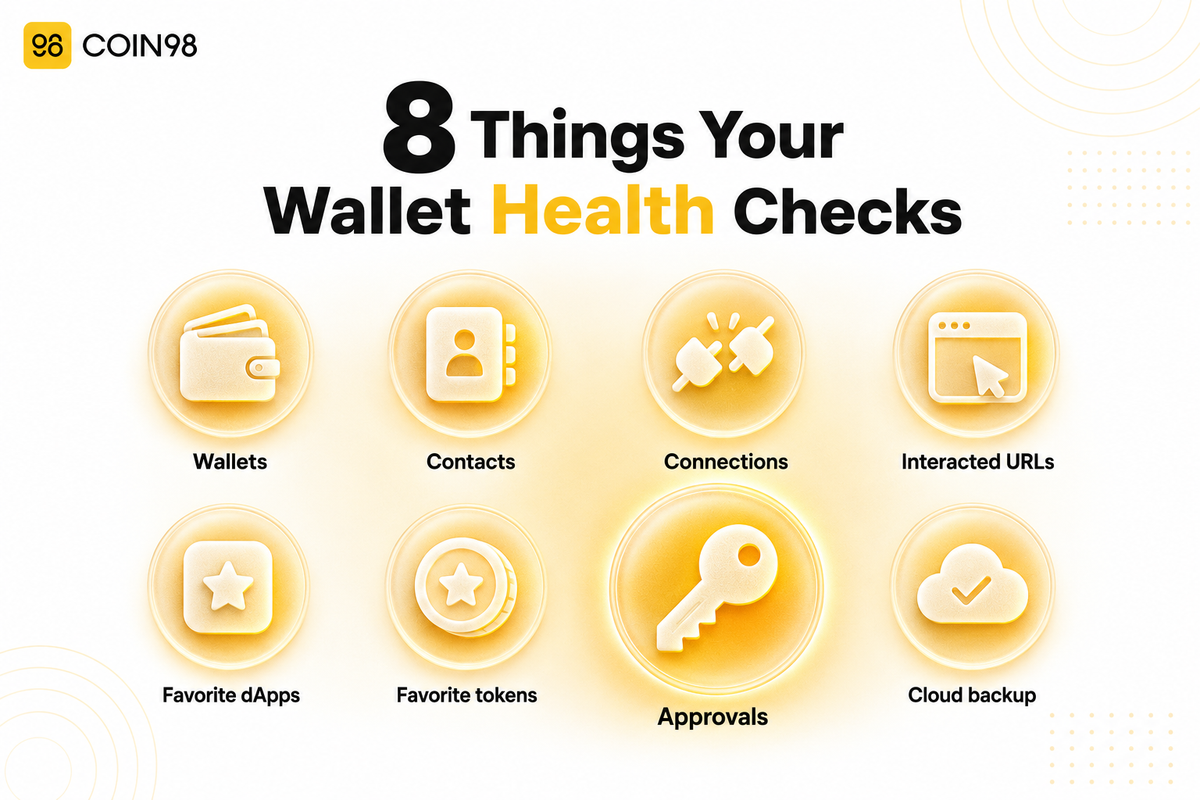
When you tap "Scan Now" in Coin98 Wallet Health, it doesn't just look at one thing — it runs eight separate checks across your wallet, from active token approvals to whether you've backed up at all. That breadth matters because most drained wallets aren't cracked open by a stolen seed phrase; they're exploited through permissions and connections the owner forgot about. In 2025, wallet-drainer phishing still cost roughly 106,000 people $83.85 million, according to Scam Sniffer. This guide walks through all eight checks in our Wallet Health scan — what each one looks at, and why it earns its place.
Why eight checks instead of one
A wallet has more than one door, so checking only the lock on the front one leaves the rest open. Approval scanners are useful, but they see a single attack surface. Coin98's own 2026 threat breakdown shows losses arriving through risky connections and social-engineered transfers as well as approvals — so a genuine "health" check has to look wider. Here's the full list before we dig in:
| # | Check | Risk it addresses |
|---|---|---|
| 1 | Wallets | Overall exposure across every wallet on the device |
| 2 | Contacts | Sending funds to a scam or wrong address |
| 3 | Connections | Lingering access from phishing/fake dApps |
| 4 | Interacted URL | Risky sites you opened but never formally connected |
| 5 | Favorite dApps | Flagged apps saved to your shortcuts |
| 6 | Favorite Tokens | Risky tokens bookmarked in Market |
| 7 | Approval | Contracts that can still move your tokens/NFTs |
| 8 | Cloud Backup | Whether you can actually recover your wallet |
1. Wallets
What it checks: every wallet on your device, so the scan covers your whole footprint rather than one address. According to our documentation, this check lets you remove risky wallets or move assets out of them.
Why it matters: most people hold several wallets — a main one, a burner for minting, an old one they've half-forgotten. Risk hides in the forgotten ones. Scanning all of them together means a dormant wallet with a bad approval can't quietly stay exposed.
2. Contacts
What it checks: your saved contact addresses, flagging ones that raise the odds of a scam or a misdirected transfer, and letting you remove suspicious entries.
Why it matters: address poisoning is a real and growing tactic — attackers seed your history with a lookalike address hoping you'll copy the wrong one next time. A saved contact feels trustworthy, which is exactly what makes a poisoned one dangerous. This check is about preventing a costly mistake, not just theft.
3. Connections
What it checks: the dApps your wallet is actively connected to, so you can revoke any you no longer trust.
Why it matters: as our docs warn, "connecting to phishing or fake websites may leave hidden security vulnerabilities" — and that access doesn't clear itself when you close the tab. A connection to a malicious site is a standing invitation; this check finds and cuts it.
4. Interacted URL
What it checks: sites you opened in the in-app dApp browser but never formally connected your wallet to, letting you close risky tabs.
Why it matters: you don't have to click "connect" to be exposed — simply loading a malicious page can start an attack. This check covers the gap between "just browsing" and "connected," a blind spot that pure approval tools ignore entirely.
5. Favorite dApps
What it checks: the applications you've bookmarked as favorites, removing any that get flagged.
Why it matters: a favorite is a shortcut you trust and reuse without thinking. If an app you bookmarked is later compromised or turns out to be a copycat, that convenience becomes a recurring risk. Keeping the favorites list clean keeps your fastest paths safe.
6. Favorite Tokens
What it checks: the tokens you've favorited in Market, flagging risky ones so you can remove them.
Why it matters: scam tokens often mimic legitimate ones to lure interactions and approvals. A bookmarked scam token is a nudge toward a bad swap or a malicious approval down the line. This is the lightest-weight check, but it trims a common on-ramp to bigger mistakes.
7. Approval
What it checks: every active token and NFT approval a smart contract holds across your wallets — and lets you revoke the risky ones in a tap.
Why it matters: this is the security core. A token approval lets a contract move specific tokens on your behalf, and as our docs put it, "dApp and token approvals do not expire automatically." One stale or malicious approval is enough to lose everything it covers — a single fraudulent approval drained roughly $1 million from one trader, per crypto.news, and Permit-style signatures accounted for 38% of large-value phishing losses in 2025. We'd suggest revoking unused approvals regularly, which this check makes a one-tap job.
8. Cloud Backup
What it checks: whether your wallet is backed up, and prompts you to set it up if not.
Why it matters: "safe" means two things — not drainable and recoverable. The other seven checks protect against loss to attackers; this one protects against loss to a broken screen or a forgotten phrase. It's the only check about getting your wallet back, and it's easy to overlook until it's too late.
What happens when a check flags something
Every check comes with a recommended action you take in the same screen — no jumping between tools. Revoke a risky approval, cut a connection, remove a suspicious contact, or enable backup, all in-app.
One thing to expect on the Approval check: each revoke is an on-chain transaction, so it needs a small gas fee on the relevant network. Revoking doesn't touch your balances — it only cancels a contract's permission to move your tokens, so your assets stay put while the open door closes.
Which checks are free?
The Free tier runs a scan across four categories and 5 blockchains, which covers the essentials. In-app risk resolution — actually revoking and removing — is a Pro feature, and the full eight-category scan plus 24/7 auto-scan is on Ultra. The scan and your resulting score are the entry point; hands-off, continuous protection sits in the higher tiers.
FAQ
Does Wallet Health only check token approvals? No. Approvals are one of eight checks. It also reviews your wallets, contacts, dApp connections, interacted URLs, favorite dApps, favorite tokens, and cloud backup status — covering theft risks, mistake risks, and recovery in one scan.
Which of the eight checks matters most? The Approval check is the security core, since an unrevoked approval can let a contract move your tokens at any time. But the Connection and Contacts checks catch risks approvals can't, and Cloud Backup is the only one about recovering your wallet — they're complementary, not ranked.
Do all eight checks cost money? Scanning is available on the Free tier (4 categories, 5 chains). In-app resolution is a Pro feature, and the full 8-category scan with 24/7 auto-scan is Ultra. Revoking an approval also costs a small on-chain gas fee regardless of tier.
Does the scan need my seed phrase or private key? No. The scan reads on-chain permission data and your wallet settings — it never asks for your seed phrase or private key, and any fix is a transaction you approve yourself.
If all eight checks pass, am I completely safe? A clean scan means low exposure at that moment, not permanent immunity. Every new approval or connection you add can reintroduce risk, so the checks are most useful re-run after you interact with new apps.
The bottom line
Coin98 Wallet Health checks eight things — wallets, contacts, connections, interacted URLs, favorite dApps, favorite tokens, approvals, and cloud backup — because real wallet safety is about more than one open permission. Together they cover theft, costly mistakes, and recovery in a single scan and a single score. Run a Wallet Health scan in Coin98 Super Wallet to see all eight checks on your own wallet.
Last updated: July 2026