Common Attacks Targeting Crypto Wallet Users in 2026, and How They Work
Crypto theft hit $3.1B in H1 2025, most by targeting user actions, not breaking cryptography. Know the attacks before they find you.
Crypto theft reached $3.1 billion in the first six months of 2025, according to Ledger Academy's security analysis — and 59% of those losses came from access control failures rather than broken cryptography, based on security data compiled across incidents. Most successful attacks bypass a wallet's technical security entirely by targeting user actions. This guide covers the most common attack types and explains the mechanics behind each.
Phishing and wallet drainer attacks
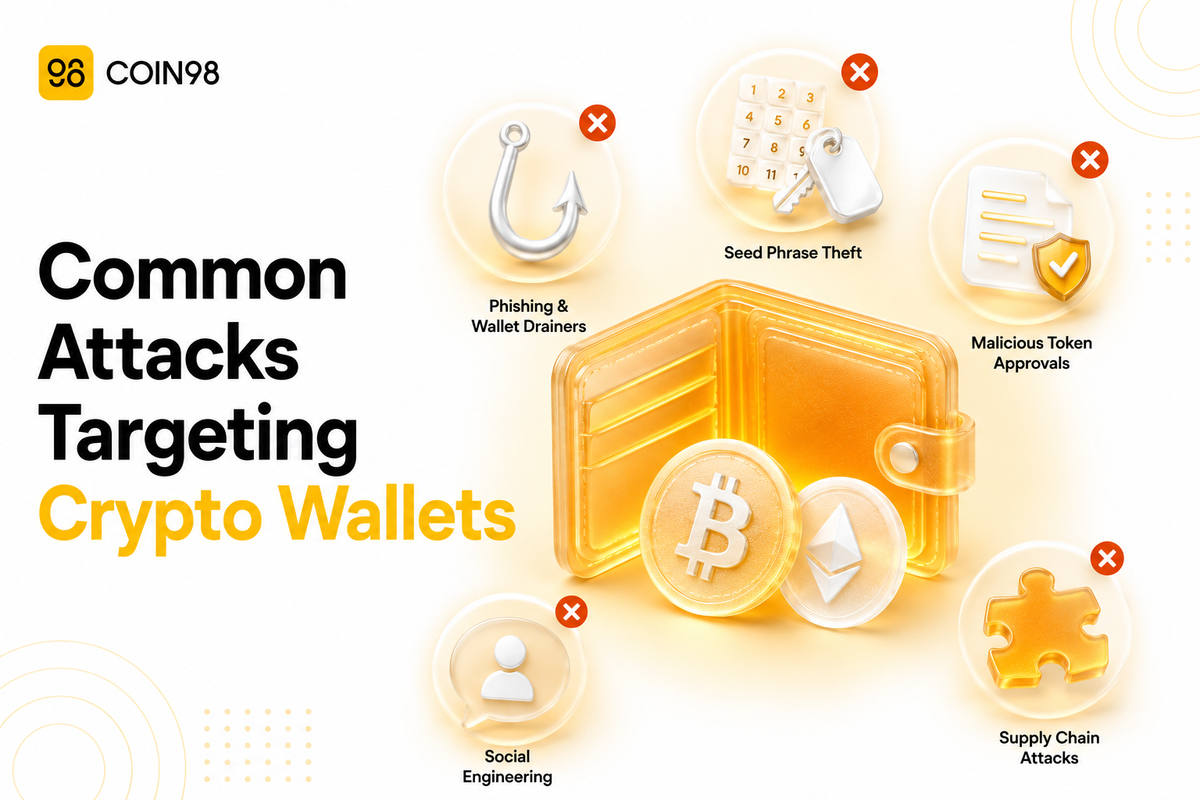
Phishing is the highest-volume threat category. Attackers build fake versions of legitimate wallet interfaces, dApp sites, or support channels and trick users into entering seed phrases or approving malicious transactions.
Wallet drainers are a targeted variant: malicious smart contracts embedded in fake dApps that execute a drain the moment a user connects and signs an approval. The contract may drain immediately or retain the permission for later use.
The scale is accelerating. Deepfake voice and video phishing attacks — where attackers impersonate founders or project teams in real-time video calls — increased 1,633% in Q1 2025 alone, according to Ledger Academy's reporting. Social engineering attacks accounted for over $340 million in losses in the first half of 2025, per Paybis security analysis.
Private key and seed phrase theft
Attackers targeting credentials directly use several distinct technical methods:
- Keyloggers — malware that records keystrokes as users type seed phrases or wallet passwords
- Clipboard hijacking — malware that monitors the clipboard, silently replacing a copied wallet address with an attacker-controlled one, or capturing a copied seed phrase before it is pasted
- Overlay attacks — malware that superimposes a fake input layer over the real wallet UI, capturing credentials entered into the invisible fake field
- Unencrypted local storage — if a wallet stores keys in plaintext in app sandboxes, preference files, or device memory, malware with sufficient permissions can extract them without user interaction
Locally stored credential theft and passphrase harvesting during entry are two of the five primary mobile wallet attack categories identified in Appdome's security research.
Coin98 Super Wallet includes a Clear Clipboard feature that removes sensitive content from the clipboard within 1 minute or on demand — reducing the window of exposure to clipboard-reading malware. For backup security, Coin98 does not store any user data; recovery requires the user's own backup password, which Coin98 cannot retrieve. (docs.coin98.com)
Malicious token approvals
When a user interacts with a dApp, the dApp typically requests an allowance to spend a specific token. Most request unlimited permissions by default — and most users approve without reviewing the amount.
The risk is twofold: a malicious dApp can drain approved tokens immediately, and any previously approved legitimate dApp that is later exploited retains whatever permissions the user originally granted. These lingering approvals persist until actively revoked.
Blind signing — approving a transaction without being able to read its full details — amplifies this risk. MetaMask's official safety documentation flags reviewing all approval requests before confirming as a critical security practice.
Coin98's built-in Wallet Approval tool lets users view and revoke smart contract permissions across multiple blockchains from inside the app, without needing an external service. (docs.coin98.com)
Supply chain and browser extension attacks
Supply chain attacks compromise the software wallets depend on rather than the wallets themselves. In September 2025, JavaScript packages with over one billion cumulative downloads were found to contain malicious code silently redirecting transaction funds to attacker-controlled addresses, according to Paybis's security reporting.
Browser extensions are a closely related vector. Security researchers identified over 40 malicious Firefox extensions impersonating established wallets — including MetaMask and Coinbase — designed specifically to steal wallet credentials. These extensions bypass standard browser defenses by mimicking the legitimate wallet at the extension layer.
Downloading wallets exclusively from official sources (verified app stores, official websites) eliminates the most common distribution path for malicious extensions. Keeping all software updated reduces exposure to known vulnerabilities in legitimate extensions.
Social engineering and device-level compromise
Social engineering consistently produces the highest individual losses. The Bybit exchange lost approximately $1.5 billion in early 2025 when the Lazarus Group manipulated a developer into running malicious code that compromised transaction signing infrastructure — not a code exploit, but a human one, according to Paybis security reporting.
For individual wallet users, social engineering most commonly takes the form of impersonation: attackers posing as official wallet support on Discord, Telegram, or X and requesting seed phrases for "account verification" or "security checks."
Device-level compromise — rooted or jailbroken devices, pen-testing tools like Frida used maliciously, or emulators — grants OS-level access that operates below the wallet app and can extract data regardless of the wallet's own protections, as documented in Appdome's attack research. Zero-click exploits, where malware executes via a received file without any user action, represent an emerging variant; Apple patched a critical zero-click flaw in its Image I/O framework in 2025.
How Coin98 addresses these vectors
Coin98 Super Wallet includes protections that directly target several of the categories above:
| Attack vector | Coin98 feature | How it helps |
|---|---|---|
| Clipboard hijacking | Clear Clipboard | Removes clipboard content within 1 minute or on demand (docs) |
| Malicious token approvals | Wallet Approval | View and revoke smart contract permissions across multiple blockchains in-app (docs) |
| Seed phrase partial loss | Seed Phrase Recovery Tool | Recovers wallets with up to 2 missing words across 12–24 word phrases on 150+ blockchains (docs) |
| Backup exposure | Cloud Backup | Coin98 does not store any of your data; your backup password cannot be recovered by Coin98 (docs) |
These features address the software and backup layer. Social engineering — someone asking for a seed phrase — requires user awareness, not software. Coin98 does not store user data and cannot recover wallet access if a backup password is lost.
Get started at coin98.com/wallet.
Frequently asked questions
Can a non-custodial crypto wallet be hacked?
Non-custodial wallets cannot be accessed through the provider — the provider does not hold keys. The most common attack paths are phishing (tricking users into revealing seed phrases), malicious token approvals (draining tokens via a compromised dApp permission), and device-level malware operating below the wallet app. A wallet's security architecture determines how much is mitigated at the software layer; the rest depends on user behavior.
What is a wallet drainer?
A wallet drainer is a malicious smart contract that executes a token drain after a user connects their wallet and approves a transaction — often on a fake dApp or fraudulent NFT mint site. The approval appears routine but grants the contract permission to move tokens. Regularly reviewing and revoking token approvals is the primary defense.
What is the most common way crypto is stolen from wallets?
Social engineering and phishing together account for the largest documented losses. 59% of 2025 crypto losses stemmed from access control failures — situations where the attacker obtained legitimate credentials or permissions rather than exploiting a code vulnerability. Most successful attacks bypass technical wallet security entirely by targeting the user.
How do supply chain attacks reach individual users?
Supply chain attacks compromise libraries or packages that wallets and dApps depend on. Users who never directly install the compromised package can still be affected if their wallet or a dApp they use relies on it. Downloading wallets from official sources and keeping software updated reduces — though does not eliminate — this exposure.
What should I do if I suspect my wallet has been compromised?
We suggest moving remaining funds to a new wallet address immediately — ideally created on a clean device or fresh browser profile. Revoke all active token approvals from the compromised address using a block explorer or an in-wallet tool like Coin98's Wallet Approval. Then identify the likely compromise vector before using the new wallet in the same environment.
Attacks on non-custodial wallets in 2026 increasingly target the user rather than the code. Understanding the mechanics — not just the name — of each attack type provides a more durable defense than any single security feature. Coin98 Super Wallet's built-in Wallet Approval, Clear Clipboard, and Cloud Backup address the most common software-layer vectors directly.