Common Mistakes When Storing Your Seed Phrase and Private Key
Most seed phrase and private key losses come from everyday mistakes, not sophisticated hacking. This guide covers the eight most common storage errors, why each one fails, and what to do instead.
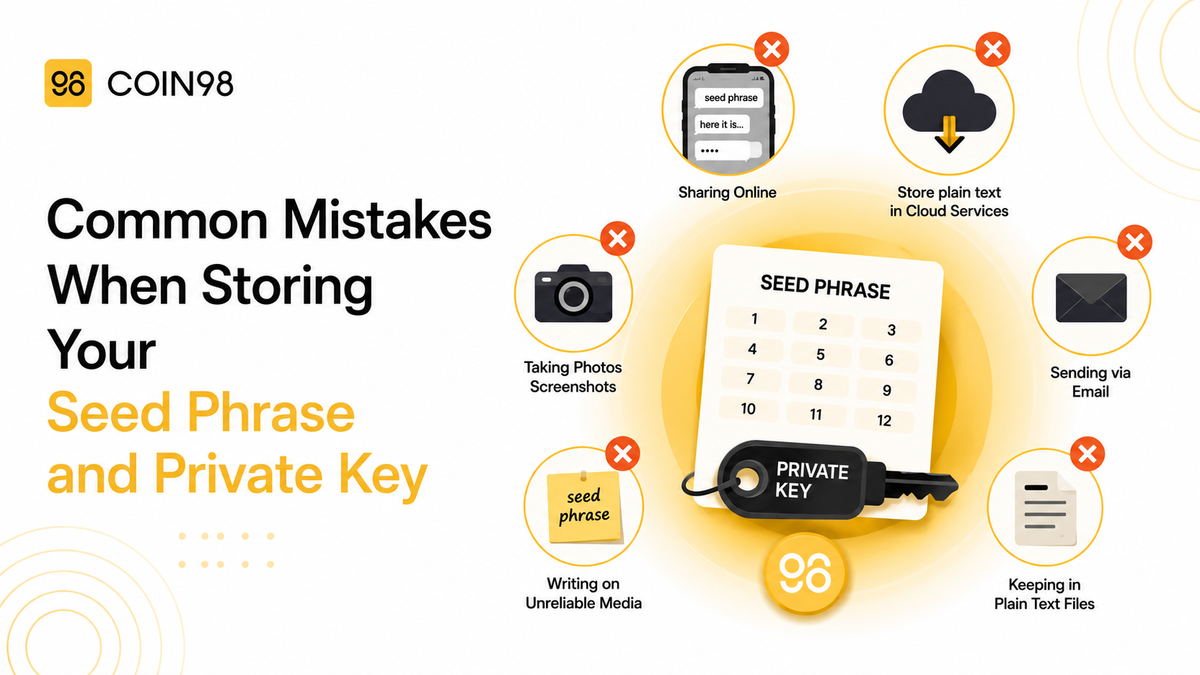
Most seed phrase and private key losses are not the result of sophisticated hacking. They result from ordinary storage mistakes — a screenshot taken for convenience, a single backup destroyed in a house fire, or a seed phrase typed into a site that looked legitimate. According to Chainalysis, user-level credential exposure drove the $2.2 billion lost to crypto theft in 2024; Valr reports that over $2 billion was stolen from crypto holders in just the first seven months of 2025 alone. The majority of those losses were preventable.
This article names the eight most common seed phrase storage mistakes, explains exactly why each one fails, and describes what to do instead.
Mistake 1: Taking a screenshot of your seed phrase
A screenshot feels harmless — it is just a photo on your phone. The problem is what happens to that photo automatically.
On iOS, screenshots upload to iCloud Photos by default. On Android, they upload to Google Photos. Within seconds of taking the screenshot, your seed phrase is stored on a cloud server owned by a third party, protected only by your Apple or Google account credentials. A phished email password, a leaked credential from a data breach, or a compromised account recovery flow now gives an attacker full wallet access — no knowledge of your wallet required.
What to do instead: We suggest writing the seed phrase by hand on paper right after wallet creation. Photographing it — even briefly — is worth reconsidering carefully given the auto-sync risks described above.
Mistake 2: Storing your seed phrase in notes apps, cloud documents, or email
Google Keep, Apple Notes, Notion, Google Docs, email drafts — any app that syncs to the cloud is one account breach away from exposing your seed phrase. Password-protecting a cloud document does not meaningfully change this: the file still lives on a server controlled by the provider, not by you.
This mistake is especially common among users who treat a seed phrase like a forgotten password — something to look up when needed. A seed phrase is not a password. It is a root cryptographic secret. Treating it like an account credential means applying account-level security to something that requires vault-level security.
What to do instead: We suggest keeping the seed phrase entirely offline. Storing digital copies of any kind — including encrypted notes, secure messaging apps, and "private" documents — is worth thinking through carefully before proceeding.
Mistake 3: Trusting a password manager as the storage solution
Password managers are excellent tools for account credentials. They are the wrong tool for seed phrases, for two reasons.
First, password managers are cloud-synced by design — the encrypted vault lives on a server. Second, the vault is protected by a single master password. A compromised master password unlocks every credential in the vault simultaneously, including your seed phrase. Bitwarden, 1Password, and similar tools are well-built for account management; they are not designed to hold an irreplaceable cryptographic secret with no recovery path.
What to do instead: We suggest using a password manager for exchange passwords and 2FA backup codes, while keeping the seed phrase on offline physical media. Using a password manager as the sole storage for a seed phrase is something we'd recommend against.
Mistake 4: Keeping only one physical copy — written in pencil
Writing your seed phrase on paper and locking it in a safe is better than storing it digitally. It is not sufficient on its own.
Paper burns and degrades from moisture over years. A single backup at one location can be destroyed in a fire, flood, or break-in before you need it. Compounding this: many users write their seed phrase in pencil, which fades significantly within months and can become unreadable within a few years. Pen or permanent ink is the right choice — pencil simply does not provide the longevity a cold-storage backup requires.
What to do instead: Use any of the following, layered together:
- Write with a pen or permanent marker — we suggest against using pencil, as ink lasts years while pencil fades.
- Engrave on a stainless steel plate — purpose-built metal backup plates are widely available. Steel withstands fire temperatures up to approximately 1,400°C and is fully waterproof, unlike paper.
- Consider a hardware wallet — devices like Ledger keep the seed phrase generated offline and stored on a secure chip, removing it from paper or digital exposure entirely.
- Store in a secure, locked location — a fireproof safe or a bank safe deposit box is worth considering.
- Make at least two copies in two separate locations — a fire, flood, or break-in at one location should not wipe out wallet access. For holdings above $5,000, geographic redundancy is strongly recommended.
Mistake 5: Not checking your surroundings when writing or recovering
Writing or recovering your seed phrase in a public space — a café, co-working office, or even an open-plan room with other people present — creates shoulder-surfing exposure that most guides overlook. Anyone who sees the words being written, or spots the phrase on your screen during restoration, has everything they need to drain the wallet.
What to do instead: We suggest handling seed phrase recording and wallet restoration in a private physical space where possible. Covering your screen and being mindful of who is nearby is worth the extra caution. An anti-glare privacy screen is also worth considering for laptops used in shared environments.
Mistake 6: Entering your seed phrase on any website or app after wallet creation
A legitimate wallet asks for your seed phrase exactly once: during initial setup, or when you deliberately restore the wallet on a new device. Any other prompt to enter your seed phrase is an attack.
Phishing sites impersonating Coin98, MetaMask, Ledger, and other wallet providers replicate the wallet interface and present a "wallet migration," "security upgrade," or "verification required" prompt. In 2024, social engineering attacks targeting seed phrase entry contributed to the majority of user-level theft, according to the Chainalysis 2025 Crypto Crime Report. Legitimate support staff — from Coin98 or any other wallet provider — will never ask for your seed phrase through any channel.
A useful rule of thumb: if anything requests your seed phrase after your wallet is already set up, we suggest treating it with serious suspicion and closing it before proceeding.
What to do instead: We recommend bookmarking official wallet and exchange URLs and navigating directly rather than through links in emails, Telegram messages, or Discord DMs. We also suggest against entering your seed phrase on any site unless you have independently verified it is legitimate — and even then, please consider carefully whether it is truly necessary, as legitimate wallet services will not ask for it.
Mistake 7: Exporting your private key without treating it as permanently exposed
Many wallets allow you to export the private key for a specific account — useful for advanced operations, but dangerous if misunderstood. The mistake is treating an exported private key as something that can be safely "put back."
Once a private key has been exported — copied to clipboard, pasted into a terminal, or saved to a file — that account's security depends on the security of every system it touched. In 2024, clipboard hijacking malware infected an estimated 300,000 devices and captured private key material during exactly these operations.
Something worth keeping in mind: a private key export is effectively a one-way operation. Once exported, the exposure cannot be undone — we suggest moving funds to a fresh address afterward and treating the source account as no longer secure.
What to do instead: We suggest avoiding private key exports unless strictly necessary. When unavoidable, clearing the clipboard immediately after use, moving funds to a new address, and deleting any file that ever contained the key are all steps worth taking.
Mistake 8: Never testing the backup — and forgetting to destroy old copies
Most users discover a bad backup at the worst possible time: when their device is lost, broken, or wiped and they need to restore. A seed phrase with a transcription error, a missing word, or words in the wrong order will not restore the wallet. At that point, the funds are permanently inaccessible.
A second, less-discussed failure: users who migrate from paper to steel plate, or move from a temporary note to a secure location, often forget to destroy the original. An old copy on a sticky note, in a cloud trash folder (cloud trash is not deleted — it is just flagged), or in a "deleted" notes entry is still a live attack surface.
What to do instead: We suggest testing the backup before funding the wallet — using the "restore wallet" flow in a fresh Coin98 Super Wallet install to verify the recorded words restore the correct address. We also recommend securely destroying any insecure intermediate copies: shredding paper, permanently emptying cloud trash, and overwriting deleted files where possible.
Seed phrase and private key storage: the correct setup
| Action | Why |
|---|---|
| Stainless steel plate, written in permanent ink | Survives fire (1,400°C), water, and time — paper and pencil do not |
| Two copies, two separate physical locations | One copy is a single point of failure |
| No digital copies of any kind | Every digital copy creates a cloud or device attack surface |
| Backup tested before funding the wallet | Transcription errors are silent until restoration is required |
| Private key exports treated as permanent exposures | Clipboard and file systems retain key material after deletion |
| Insecure interim copies destroyed | Old copies remain live attack surfaces even after "deletion" |
| Surroundings checked before writing or recovering | Shoulder-surfing exposure is physical, not digital |
Coin98 Super Wallet is non-custodial — your seed phrase is generated locally and never transmitted to Coin98's servers. It supports Ledger hardware wallet integration, which moves private key storage entirely to a hardware chip. Install only from the official source.
Frequently Asked Questions
Is it safe to take a screenshot of my seed phrase?
We suggest against it. Screenshots on both iOS and Android sync automatically to cloud storage — iCloud Photos and Google Photos respectively. A screenshot places your seed phrase on a third-party server protected only by your account credentials. Writing it by hand is the safer approach we'd recommend.
Is it safe to store a seed phrase in a password manager?
We'd suggest against it for seed phrases specifically. Password managers are cloud-synced and protected by a single master password. A compromised master password exposes every stored credential simultaneously. We recommend using a password manager for exchange passwords, while keeping the seed phrase on offline physical media.
What happens if I lose my seed phrase?
If your seed phrase is lost and your device is also lost, reset, or broken, recovery depends on what backup you have in place. For most wallets, there is no recovery mechanism — no blockchain reset, no support escalation, no court order can retrieve the funds.
However, if you use Coin98 Super Wallet's cloud backup feature, your encrypted seed phrase is stored securely and can be used to restore wallet access on a new device — as long as you still have the password protecting that backup. This is one of the reasons we suggest enabling the cloud backup feature early, before you need it. We strongly recommend verifying that the backup is active and accessible before your device is your only point of failure.
Is my wallet safe if I use Coin98 Wallet's cloud backup feature?
Yes — and it is worth understanding exactly why. Coin98 Super Wallet is non-custodial, which means your seed phrase is generated directly on your device and never transmitted to Coin98's servers in plaintext. Coin98 does not hold, see, or have any access to your seed phrase at any point.
When the cloud backup feature is used, the seed phrase is encrypted on your device first — before any data leaves it. The encrypted payload is what gets stored in the cloud, not the raw phrase. Decrypting it requires your personal password or biometric that only you hold; without that, the backup is unreadable even to Coin98 or the cloud storage provider.
This is meaningfully different from, for example, saving a seed phrase directly in Google Drive or iCloud Notes, where the file is stored in plaintext and is accessible to anyone who gains access to the account. Coin98's backup applies an additional layer of client-side encryption that those services do not provide.
That said, the strength of the cloud backup is directly tied to the strength of the password protecting it. We recommend using a strong, unique password for this feature and treating that password with the same care as the seed phrase itself.