The Risks of Using a Crypto Wallet on Public Wi-Fi (and How to Stay Safe)
Hackers stole $3.4B in crypto in 2025. Here's why public Wi-Fi is one of the most dangerous places to access your wallet — and how to stay safe.
Hackers stole $3.4 billion in direct crypto hacks in 2025 alone — and public Wi-Fi is one of the most overlooked entry points. If you've ever checked your wallet balance at a coffee shop or signed a transaction at an airport, this guide covers what's actually at risk and what you can do about it.
Public Wi-Fi networks are convenient, but they were not built with the security guarantees your crypto wallet needs. Unlike your home router, most public networks are shared, lightly monitored, and offer no reliable way to verify who else is on them. That combination creates a straightforward opportunity for attackers targeting high-value assets — and crypto qualifies.
Why Public Wi-Fi Is Dangerous for Crypto Wallets
Public Wi-Fi puts your crypto wallet at risk because most public networks transmit data without strong end-to-end encryption. Anyone on the same network — or running their own rogue access point nearby — can potentially intercept the traffic between your device and the wallet server.
This risk is meaningfully different from browsing social media on the same network. Crypto transactions are irreversible. Once an attacker captures your seed phrase, private key, or a transaction in progress, the loss is assured — blockchain finality means there is no way to reverse it. The 2025 FBI Internet Crime Report placed total crypto-related fraud losses at $11.36 billion — a figure that includes losses originating from compromised credentials and intercepted sessions, not just exchange hacks.
The risk is also documented, not theoretical. In 2019, an individual lost approximately $60,000 in Bitcoin after connecting to unprotected airport Wi-Fi without a VPN or two-factor authentication enabled, according to SecuritySenses. The attacker intercepted session data and gained account access during that window.
5 Attacks That Target Crypto Wallets on Public Wi-Fi
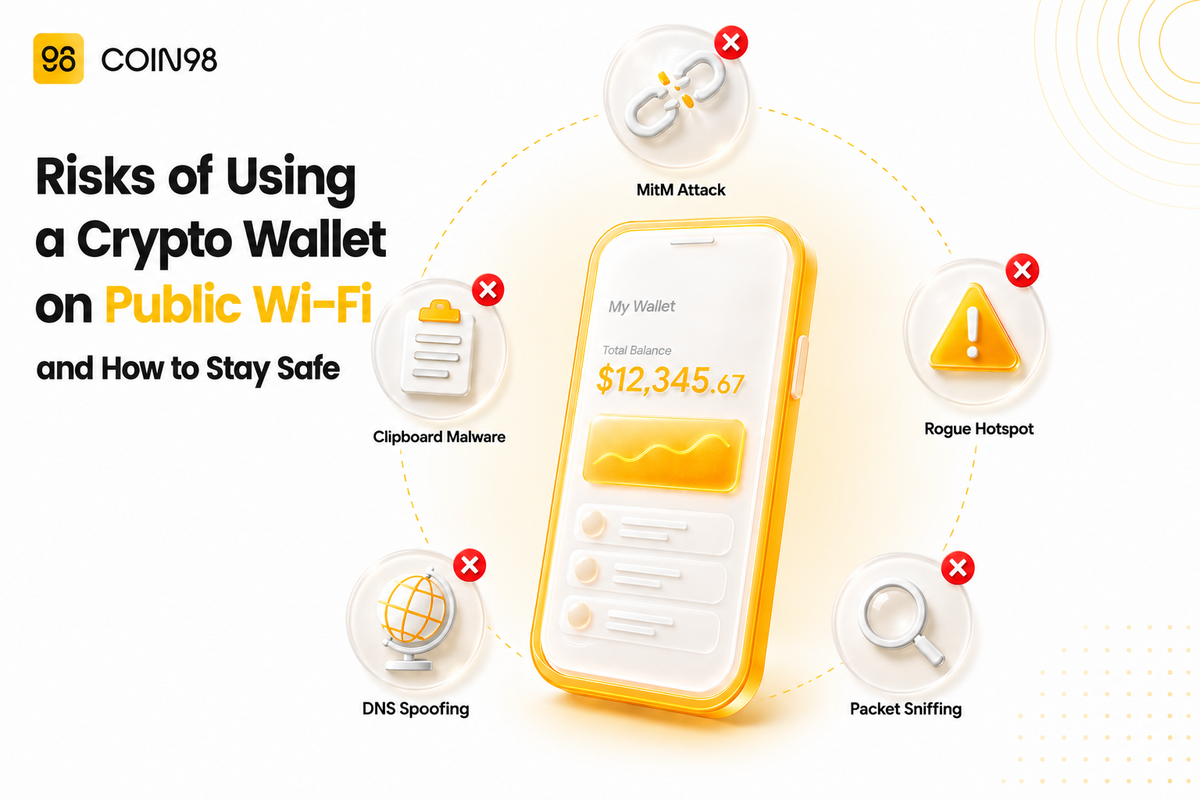
Public networks expose crypto wallet users to five distinct attack types — each targeting a different point in the chain between your device and your funds.
1. Man-in-the-Middle (MitM) Attacks
In a MitM attack, a hacker positions themselves between your device and the network — intercepting communications before they reach their destination. On an unencrypted network, this can expose wallet credentials, private keys, and recovery phrases in transit. MitM positioning on public networks remains straightforward due to known vulnerabilities in how many public routers handle encryption, according to Merlin Crypto's 2025 analysis.
2. Rogue Access Points
Attackers create fake Wi-Fi networks with names designed to look legitimate — "Airport_Free_WiFi," "Cafe_Guest," or a close misspelling of the venue's actual network. Once connected, all your traffic routes through the attacker's device. Rogue access point attacks are particularly effective because the window between connecting and realising something is wrong often spans multiple transactions.
3. Packet Sniffing
Network analysis tools can capture unencrypted data packets on a shared network. When a crypto wallet app sends login information or session tokens over an unencrypted connection, packet sniffing can surface those credentials. This is especially relevant for wallet apps or browser extensions that don't enforce HTTPS on every request, according to FailSafe's public Wi-Fi risk analysis.
4. DNS Spoofing
Attackers manipulate the domain name system on a compromised network to redirect traffic to a fraudulent copy of a legitimate wallet interface or exchange. You enter the correct URL; the compromised DNS sends you somewhere else. The cloned page captures your login credentials before you notice anything went wrong.
5. Session Hijacking and Malware Delivery
Public networks are an efficient delivery channel for malware. Attackers exploit network weaknesses to push fake software updates that install applications designed to search for wallet private keys or clipboard contents. The 2017 KRACK vulnerability in Wi-Fi Protected Access (WPA2) demonstrated that even nominally "secured" public networks can be exploited to reconnect devices under attacker control, according to AtomicWallet's security documentation.
A particularly dangerous variant is crypto-clipper malware: it monitors your clipboard and silently replaces a wallet address you copied with an attacker-controlled one at the moment you paste it into a transaction. By the time you notice — if you notice — the funds have been irreversibly sent.
What Are the Targets of These Attacks?
The target is usually one of three things.
Your seed phrase or private key. This is the master credential for any self-custody wallet. Anyone who obtains it controls your funds permanently — no wallet app, no security feature, and no platform can recover assets from a wallet whose seed phrase is compromised.
Your session token. Even without your seed phrase, a hijacked session on an exchange or custodial wallet may give an attacker enough access to initiate withdrawals during the active window.
Your transaction data. Crypto-clipper malware and address-substitution attacks don't need your seed phrase — they redirect funds at the moment you execute a transaction. Carnegie Mellon CyLab researchers identified 270 million address poisoning attempts targeting 17 million victims between July 2022 and June 2024, as cited in CoinLaw's 2026 security statistics report.
How to Stay Safe When Using a Crypto Wallet on Public Wi-Fi
The most reliable protection is the simplest: we'd recommend using mobile data — your phone's cellular connection — instead of public Wi-Fi whenever you need to access your wallet or sign a transaction. A cellular connection does not broadcast your traffic on a shared local network, which removes the attack surface described above.
When that's not possible, these measures reduce your exposure meaningfully:
Use a VPN with a kill switch. A reputable VPN encrypts traffic between your device and the VPN server, making packet sniffing and MitM attacks significantly harder. The kill-switch feature matters: it cuts your internet connection if the VPN drops, preventing your unencrypted traffic from briefly exposing you during reconnection.
Enable two-factor authentication (2FA) on every account. Only 40% of crypto users enable 2FA according to CoinLaw's 2026 security report. We suggest using a dedicated authenticator app — time-based one-time passwords (TOTP) — rather than SMS, which is vulnerable to SIM-swap attacks.
Always verify the full wallet address before confirming a transaction. Crypto-clipper malware targets the moment between copying and pasting. We'd recommend checking the first four and last four characters of any recipient address before signing. If they don't match what you entered, cancel the transaction. One way to reduce this risk further is using Coin98's OneID — a Web3 username (e.g. yourname.c98) that replaces raw hex addresses entirely, giving clipboard-hijacking malware nothing to substitute.
Defer large transactions to a trusted network. If a transaction can wait until you're on a trusted connection, it should. The risk-to-reward ratio of executing significant transfers over public Wi-Fi is poor regardless of what other protections are in place.
Choose a wallet with built-in device-level protections. App-level PIN locks, automatic clipboard clearing, and active fraud detection reduce the impact of a compromised network session. Coin98 Super Wallet enforces its own PIN on every app open — independently of the device screen lock — meaning a compromised lock screen does not automatically expose the wallet. It also includes a Clear Clipboard feature that removes sensitive content from the clipboard within one minute or on demand, limiting the window for clipboard-sniffing malware.
Keep your device updated. Protocol-level exploits target known weaknesses in outdated software. Automatic OS updates close these windows faster than manual schedules.
What to Look for in a Wallet App
When evaluating a wallet for situations where you may need to act on the go, these are the security features worth checking:
| Feature | What it protects against |
|---|---|
| App-level PIN / biometric lock | Device theft, opportunistic session access |
| Automatic clipboard clearing | Crypto-clipper malware, clipboard sniffing |
| AI fraud detection | Phishing dApps, suspicious transaction patterns |
| Independent security audit | Unknown vulnerabilities in wallet code |
| Non-custodial architecture | Exchange-side breaches, custodial hacks |
Coin98 Super Wallet's Cypheus AI assistant adds real-time fraud detection — flagging suspicious dApp interactions and transaction patterns — which is particularly useful where phishing sites may be injected via DNS spoofing. Its non-custodial design means Coin98 does not hold user keys, which removes custodial breach risk entirely.
Frequently Asked Questions
Can hackers steal crypto through public Wi-Fi?
Yes. Public Wi-Fi creates several attack surfaces for crypto theft: man-in-the-middle attacks can intercept session tokens and credentials, packet sniffing can capture unencrypted data, and malware delivered via compromised networks can steal seed phrases or hijack clipboard content during transactions. The risk is higher than for general browsing because crypto transactions are irreversible.
Is a VPN enough to protect my crypto wallet on public Wi-Fi?
A VPN significantly reduces risk by encrypting your traffic, but it is not a complete solution on its own. It doesn't protect against malware already on your device, phishing sites, or attacks that occur before the VPN tunnel is established. We'd recommend treating a VPN as one layer in a broader approach — combined with 2FA, address verification, and switching to mobile data for any significant transactions.
What is a man-in-the-middle attack in crypto?
A man-in-the-middle (MitM) attack is when a hacker intercepts communications between your device and a server — in a crypto context, typically between your wallet app and a blockchain node or exchange. On an unencrypted public network, the attacker can read session tokens, capture login credentials, or modify transaction data in transit. The attack is "man-in-the-middle" because the hacker sits between both parties without either one being aware.
Does Coin98 Super Wallet offer protection against public Wi-Fi threats?
Coin98 Super Wallet includes several features that limit exposure on untrusted networks: an app-level PIN lock independent of the device screen lock, automatic clipboard clearing to limit clipboard-sniffing exposure, and the Cypheus AI layer for real-time fraud and phishing detection. That said, no wallet app eliminates network-level risks entirely — we'd still suggest using mobile data or a VPN when accessing your wallet away from a trusted connection.
Closing Thoughts
Public Wi-Fi is not built for the security requirements of self-custody crypto. The attack surface — MitM interception, rogue networks, packet sniffing, DNS spoofing, clipboard malware — is real and documented. The protections are practical: mobile data over public Wi-Fi wherever possible, a kill-switch VPN when that's not an option, 2FA on every account, and a wallet with built-in device-level safeguards.
If you're looking for a wallet that pairs self-custody control with active security features, Coin98 Super Wallet supports 150+ blockchains with a CertiK-audited codebase, app-level locking, and AI-powered fraud detection. Download it on App Store or Google Play to manage your assets with one fewer risk to think about.
Last updated: June 2026